|
RadiantQ jQuery Gantt Package
Task Popups
|   |
|
RadiantQ jQuery Gantt Package
Task Popups
| |
Popups are shown when the end-user interacts with the task, when they move it and resize it. While the default content might be good enough and appropriate enough for most scenarios, you can replace these popups with custom popups in necessary.
These are the properties in GanttChart that will allow you do this:
- ResizeInfoPopup
- MovingInfoPopup
The class reference for these properties contain information on the DataContext that will be applied on these custom popup instances and you can construct your custom popup accordingly.
The custom look of the popup should be defined as template.
|
<script id="MovingInfoPopup" type="text/x-jquery-tmpl"> <table class="draggingContent" style="width: 180px;"> <tr> <td colspan='2' align='center'>${RadiantQ_TaskString} </td> </tr> <tr> <td>${RadiantQ_StartString} : ${data.StartTime.toString('yyyy-MM-dd HH:mm')} </td> </tr> <tr> <td>${RadiantQ_FinishString} : ${data.EndTime.toString('yyyy-MM-dd HH:mm')} </td> </tr> </table> </script> <script id="ResizeInfoPopup" type="text/x-jquery-tmpl"> <table class='draggingContent' style='width: 180px;'> <tr> <td colspan='2' align='center'>Task </td> </tr> <tr> <td style='float: right;'>Duration : </td> <td>#if (data.Duration){# #= data.Duration.days_M() #d #= data.Duration.hours_M() #h #}# </td> </tr> <tr> <td style='float: right;'>StartTime : </td> <td>${data.StartTime.toString('yyyy-MM-dd HH:mm')}</td> </tr> <tr> <td style='float: right;'>EndTime :</td> <td>${data.EndTime.toString('yyyy-MM-dd HH:mm')}</td> </tr> </table> </script> |
|
$('#container').FlexyGantt({ MovingInfoPopup: $("#MovingInfoPopup").html(), ResizeInfoPopup: $("#ResizeInfoPopup").html() }); |
In ASP.NET MVC
|
@Html.JQFlexyGantt( new JQFlexyGanttSettings() { .. Options = new FlexyGanttOptions() { GanttChartOptions = new GanttChartOptions() { AnchorTime = DateTime.Today, MovingInfoPopupID = "MovingInfoPopup", ResizeInfoPopupID = "ResizeInfoPopup", } } } ) |
In ASP.NET
|
<RQ:FlexyGantt ID="gantt" AfterDataRetrievedCallback="AfterDataRetrievedCallback" AfterGanttWidgetInitializedCallback="AfterGanttWidgetInitializedCallback" ParentTaskEndTimeProperty="OverallEndTime" ParentTaskStartTimeProperty="OverallStartTime" TaskEndTimeProperty="EndTime" MovingInfoPopupID="MovingInfoPopup" ResizeInfoPopupID="ResizeInfoPopup" TaskStartTimeProperty="StartTime" HierarchyResolverFunction="ResolverFunction" DataSourceUrl="../../DataSources/FGTaskListHandler.ashx" LocalizationResourceFilePath="../../Src/ResourceStrings/" Height="500" runat="server" TaskItemTemplate="<div class='rq-gc-taskbar' data-bind='TaskColor:EndTime'><div class='rq-taskbar-dragThumb'></div><div class='rq-taskbar-resizeThumb'></div><div class='lable' data-bind='TaskColor:EndTime'></div></div>" ParentTaskItemTemplate="<div class='parentBar-style'><div class='dragThumb'></div><div class='rq-taskbar-resizeThumb'></div><div class='parentLeftPoly-style'></div><div class='rq-gc-parentBar-middle'></div><div class='rq-gc-parentBar-rightCue'></div></div>" /> |
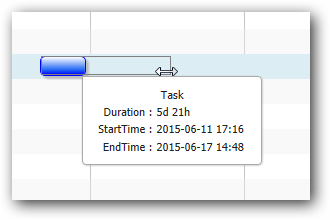
Customized Task Popup
This is illustrated in this samples:
In HTML : ..\Samples\FlexyGanttCustomTaskLook.htm.
In ASP.NET MVC : ..\Views\Home\FlexyGantt\FlexyGanttCustomTaskLook.cshtml.
In ASP.NET : ..\Samples\FlexyGantt\FlexyGanttCustomTaskLook.aspx.
© RadiantQ 2022. All Rights Reserved.