|
RadiantQ jQuery Gantt Package
Task labels
|   |
|
RadiantQ jQuery Gantt Package
Task labels
| |
Taskbar Labels
You might have to render icons, shapes, text, etc. right next to the task bars to indicate status, annotation, etc. This is easily implemented by extending the default task template by defining a custom TaskItemTemplate, discussed in detail, in this section.
For example, you might want to mark certain tasks with a "Critical" text to it's right as follows:
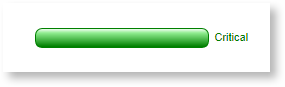
Label to the right of Task bar
You can use below code to achieve this.
Define a task template like below. This template contains the default UI elements that make the task bar and an additional div (with class "rq-gc-taskbar-label") that represents the label.
|
var pTemplate = "<div class='parentBar-style'><div class='dragThumb'></div><div class='rq-taskbar-resizeThumb'></div><div class='parentLeftPoly-style'></div><div class='rq-gc-parentBar-middle'></div><div class='rq-gc-parentBar-rightCue'></div></div>"; // The template that defines the look for the task bars. "taskbar-style" is a built-in style that defines a default look for the task bars. var tTemplate = "<div class='rq-gc-taskbar' data-bind='TaskColor:EndTime'><div class='rq-taskbar-dragThumb'></div><div class='rq-taskbar-resizeThumb'></div><div class='lable' data-bind='TaskColor:EndTime'></div></div>"; var $gantt_container = $("#gantt_container"); // Initialize the FlexyGantt widget. $gantt_container.FlexyGantt({ DataSource: self.jsonData, TaskItemTemplate: tTemplate, ParentTaskItemTemplate: pTemplate }); RadiantQ.Binder.TaskColor = function ($elem, role, value, data) { this.element = $elem; this.data = data; this.init = function () { var duration = new RQTimeSpan(data.EndTime - data.StartTime); var durationdays = duration.days; if (durationdays > 2) { if (this.element.hasClass("lable")) { updateText(this.element, data.EndTime); this.element.css("color", "green"); } else { this.element[0].style.setProperty('background-image', "url('" + greenBarImageURL + "')", "important"); this.element.css("border-color", "green", "!important"); } } else { if (this.element.hasClass("lable")) { this.element.css("color", "blue"); updateText(this.element, data.EndTime); } else { this.element[0].style.setProperty('background-image', "url(../../Src/Styles/Images/TaskBar.png)", "important"); this.element.css("border-color", "blue", "!important"); } } } this.refresh = function () { this.init(); } }; function updateText(element, endTime) { if (endTime < new Date()) $(element).text("Critical"); else $(element).text(""); } |
In ASP.NET MVC
|
<script type="text/javascript"> RadiantQ.Binder.TaskColor = function ($elem, role, value, data) { this.element = $elem; this.data = data; this.init = function () { var duration = new RQTimeSpan(data.EndTime - data.StartTime); var durationdays = duration.days; if (durationdays > 2) { if (this.element.hasClass("lable")) { updateText(this.element, data.EndTime); this.element.css("color", "green"); } else { this.element[0].style.setProperty('background-image', "url('" + greenBarImageURL + "')", "important"); this.element.css("border-color", "green", "!important"); } } else { if (this.element.hasClass("lable")) { this.element.css("color", "blue"); updateText(this.element, data.EndTime); } else { this.element[0].style.setProperty('background-image', "url(../../Src/Styles/Images/TaskBar.png)", "important"); this.element.css("border-color", "blue", "!important"); } } } this.refresh = function () { this.init(); } }; function updateText(element, endTime) { if (endTime < new Date()) $(element).text("Critical"); else $(element).text(""); } </script> @Html.JQFlexyGantt( new JQFlexyGanttSettings() { ControlId = "gantt_container", AfterGanttWidgetInitializedCallback = "AfterGanttWidgetInitializedCallback", DataSourceUrl = new Uri("/Home/GetFlexyGanttItemSource", UriKind.RelativeOrAbsolute), Options = new FlexyGanttOptions() { HierarchyResolverFunction = "ResolverFunction", TaskTooltipTemplateID = "TaskTooltipTemplate", TaskStartTimeProperty = "StartTime", ParentTaskStartTimeProperty = "OverallStartTime", TaskItemTemplate ="<div class='rq-gc-taskbar' data-bind='TaskColor:EndTime'><div class='rq-taskbar-dragThumb'></div><div class='rq-taskbar-resizeThumb'></div><div class='lable' data-bind='TaskColor:EndTime'></div></div>", ParentTaskItemTemplate = "<div class='parentBar-style'><div class='dragThumb'></div><div class='rq-taskbar-resizeThumb'></div><div class='parentLeftPoly-style'></div><div class='rq-gc-parentBar-middle'></div><div class='rq-gc-parentBar-rightCue'></div></div>", TaskEndTimeProperty = "EndTime", ParentTaskEndTimeProperty = "OverallEndTime", GanttChartOptions = new GanttChartOptions() { AnchorTime = DateTime.Today } } } ) |
In ASP.NET
|
<script type="text/javascript"> RadiantQ.Binder.TaskColor = function ($elem, role, value, data) { this.element = $elem; this.data = data; this.init = function () { var duration = new RQTimeSpan(data.EndTime - data.StartTime); var durationdays = duration.days; if (durationdays > 2) { if (this.element.hasClass("lable")) { updateText(this.element, data.EndTime); this.element.css("color", "green"); } else { this.element[0].style.setProperty('background-image', "url('" + greenBarImageURL + "')", "important"); this.element.css("border-color", "green", "!important"); } } else { if (this.element.hasClass("lable")) { this.element.css("color", "blue"); updateText(this.element, data.EndTime); } else { this.element[0].style.setProperty('background-image', "url(../../Src/Styles/Images/TaskBar.png)", "important"); this.element.css("border-color", "blue", "!important"); } } } this.refresh = function () { this.init(); } }; function updateText(element, endTime) { if (endTime < new Date()) $(element).text("Critical"); else $(element).text(""); } </script> <RQ:FlexyGantt ID="gantt" AfterDataRetrievedCallback="AfterDataRetrievedCallback" AfterGanttWidgetInitializedCallback="AfterGanttWidgetInitializedCallback" ParentTaskEndTimeProperty="OverallEndTime" ParentTaskStartTimeProperty="OverallStartTime" TaskEndTimeProperty="EndTime" TaskStartTimeProperty="StartTime" HierarchyResolverFunction="ResolverFunction" DataSourceUrl="../../DataSources/FGTaskListHandler.ashx" LocalizationResourceFilePath="../../Src/ResourceStrings/" Height="500" runat="server" TaskItemTemplate="<div class='rq-gc-taskbar' data-bind='TaskColor:EndTime'><div class='rq-taskbar-dragThumb'></div><div class='rq-taskbar-resizeThumb'></div><div class='lable' data-bind='TaskColor:EndTime'></div></div>" ParentTaskItemTemplate="<div class='parentBar-style'><div class='dragThumb'></div><div class='rq-taskbar-resizeThumb'></div><div class='parentLeftPoly-style'></div><div class='rq-gc-parentBar-middle'></div><div class='rq-gc-parentBar-rightCue'></div></div>" /> |
And remember to define the rq-gc-taskbar-label CSS as follows.
In the margin-right, specify "-40px" so that the text will always be rendered 40 pixels to the right of the bar.
|
<style type="text/css"> .rq-gc-taskbar-label { padding-top: 2px; float: right; margin-right: -40px; } </style> |
This is illustrated in these samples:
In HTML : ..\Samples\FlexyGanttCustomTaskLook.htm.
In ASP.NET MVC : ..\Views\Home\FlexyGantt\FlexyGanttCustomTaskLook.cshtml.
In ASP.NET : ..\Samples\FlexyGantt\FlexyGanttCustomTaskLook.aspx.
© RadiantQ 2022. All Rights Reserved.