|
RadiantQ jQuery Gantt Package
Overlapped Tasks Look
|   |
|
RadiantQ jQuery Gantt Package
Overlapped Tasks Look
| |
Overlapped Tasks Look
By default when there are tasks with overlapping time spans, they simply get rendered on top of each other like below.
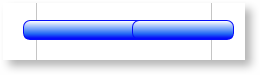
Overlapping Bars
Shrunk Height
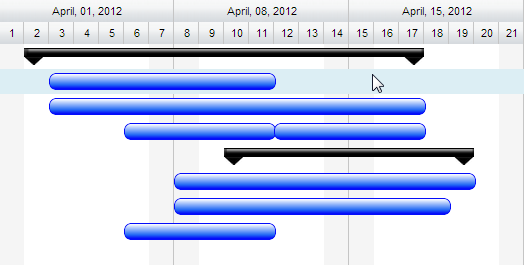
But you have the option to automatically make them render shrunk in height one-below the other within the same row as below.
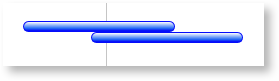
Overlapping Bars with Shrunk Height
This is easily achieved by setting "OverlappedTasksRenderingOptimization" option in FlexyGantt widget.
|
$( '#container' ).FlexyGantt({ OverlappedTasksRenderingOptimization: "ShrinkHeight" ... }); |
In ASP.NET MVC
|
@Html.JQFlexyGantt( new JQFlexyGanttSettings() { ControlId = "gantt_container", AfterDataRetrievedCallback = "AfterDataRetrievedCallback", AfterGanttWidgetInitializedCallback = "AfterGanttWidgetInitializedCallback", DataSourceUrl = new Uri("/Home/GetOverlappedTasksChangingRowHeightSource", UriKind.RelativeOrAbsolute), Options = new FlexyGanttOptions() { AnchorTime = DateTime.Today, HierarchyResolverFunction = "ResolverFunction", TaskTooltipTemplateID = "TaskTooltipTemplate", OverlappedTasksRenderingOptimization = OverlappedTasksRenderingOptimization.ShrinkHeight, ... } } }) |
In ASP.NET
|
<RQ:FlexyGantt runat="server" OnLoad="flexyGantt_Load" ID="gantt" Height="500" AfterGanttWidgetInitializedCallback="AfterGanttWidgetInitializedCallback" HierarchyResolverFunction="ResolverFunction" AfterDataRetrievedCallback="AfterDataRetrievedCallback" DataSourceUrl="../../DataSources/OverlappedTasksChangingRowHeightSourceSource.ashx" TaskTooltipTemplateID="TaskTooltipTemplate" OverlappedTasksRenderingOptimization="ShrinkHeight" .. /> |
Data Binding the bars to the overlapped state
You can also change the look and feel of overlapping bars based on whether or not they are overlapping using RadiantQ binding, below code will allows you to do that,
First insert a new property called IsOverlapping into your JSON objects representing the tasks and trigger them when it gets changed, like this:
|
function insertIsOverlappingObject(jsonData) { for (var tIndex = 0; tIndex < jsonData.length; tIndex++) { var resources = jsonData[tIndex].Resources; if (resources) { for (var rIndex = 0; rIndex < resources.length; rIndex++) { tasks = resources[rIndex].Tasks; if (tasks) { for (var index = 0; index < tasks.length; index++) { tasks[index]["IsOverlapping"] = null; RadiantQ.Gantt.Utils.InsertPropertyChangedTriggeringProperty(tasks[index], ["IsOverlapping"], true); } } } } } } |
Then create the RadiantQ binder and bind it to the gantt
|
RadiantQ.Binder.OverlappingBinder = function ($elem, role, value, data) { this.element = $elem; this.value = value; this.data = data; this.init = function () { this.element.removeClass("bluebar_style"); this.element.removeClass("redbar_style"); if (this.data.IsOverlapping == true) this.element.addClass("redbar_style"); else this.element.addClass("bluebar_style"); } this.refresh = function () { this.init(); } } |
In HTML
Then specify data-binding like this in the task template to make it appear red when overlapped and blue when not.
|
var tTemplate = "<div class= 'rq-gc-tooltip rq-gc-taskbar' data-bind='OverlappingBinder:IsOverlapping'><div class='rq-taskbar-dragThumb'></div><div class='rq-taskbar-resizeThumb'></div><div class='start-resizeThumb'></div></div>"; |
|
<script type="text/javascript"> // will call when source is retrieved form server function AfterDataRetrievedCallback(jsonData) { insertIsOverlappingObject(jsonData); } </script> @Html.JQFlexyGantt( new JQFlexyGanttSettings() { ControlId = "gantt_container", AfterDataRetrievedCallback = "AfterDataRetrievedCallback", AfterGanttWidgetInitializedCallback = "AfterGanttWidgetInitializedCallback", DataSourceUrl = new Uri("/Home/GetOverlappedTasksChangingRowHeightSource", UriKind.RelativeOrAbsolute), Options = new FlexyGanttOptions() { HierarchyResolverFunction = "ResolverFunction", OverlappedTasksRenderingOptimization = OverlappedTasksRenderingOptimization.ShrinkHeight, TasksListProperty = "EmployeeTasks", FlatItemsSourceCreated = "FlatItemsSourceCreated", TaskStartTimeProperty = "StartTime", ParentTaskStartTimeProperty = "OverallStartTime", TaskItemTemplate = "<div class= 'rq-gc-tooltip rq-gc-taskbar' data-bind='OverlappingBinder:IsOverlapping'><div class='rq-taskbar-dragThumb'></div><div class='rq-taskbar-resizeThumb'></div><div class='start-resizeThumb'></div></div>", ParentTaskItemTemplate = "<div class='rq-gc-parentBar'><div class='dragThumb'></div><div class='rq-taskbar-resizeThumb'></div><div class='parentLeftPoly-style'></div><div class='parentMiddleBar-style'></div><div class='rq-gc-parentBar-rightCue'></div></div>", TaskEndTimeProperty = "EndTime", ParentTaskEndTimeProperty = "OverallEndTime", .. } } ) |
In ASP.NET
|
<script runat="server"> protected void flexyGantt_Load(object sender, EventArgs e) { this.gantt.TaskItemTemplate = "<div class='rq-gc-taskbar' data-bind='OverlappingBinder:IsOverlapping'><div class='rq-taskbar-dragThumb'></div><div class='rq-taskbar-resizeThumb'></div></div>"; } </script> <script type="text/javascript"> // will call when source is retrieved form server function AfterDataRetrievedCallback(jsonData) { insertIsOverlappingObject(jsonData); } </script> <RQ:FlexyGantt runat="server" OnLoad="flexyGantt_Load" ID="gantt" Height="500" AfterGanttWidgetInitializedCallback="AfterGanttWidgetInitializedCallback" HierarchyResolverFunction="ResolverFunction" AfterDataRetrievedCallback="AfterDataRetrievedCallback" DataSourceUrl="../../DataSources/OverlappedTasksChangingRowHeightSourceSource.ashx" TaskTooltipTemplateID="TaskTooltipTemplate" OverlappedTasksRenderingOptimization="ShrinkHeight" TaskStartTimeProperty="StartTime" TasksListProperty="EmployeeTasks" ParentTaskStartTimeProperty="OverallStartTime" ParentTaskItemTemplate="<div class='rq-gc-parentBar'><div class='dragThumb'></div><div class='rq-taskbar-resizeThumb'></div><div class='parentLeftPoly-style'></div><div class='parentMiddleBar-style'></div><div class='rq-gc-parentBar-rightCue'></div></div>" TaskEndTimeProperty="EndTime" ParentTaskEndTimeProperty="OverallEndTime" /> |
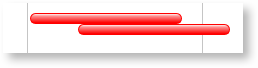
Overlapping bars with custom formatting
This is illustrated in this samples:
In HTML : ..\Samples\OverlappedTasksRendering.htm.
In ASP.NET MVC : ..\Views\Home\FlexyGantt\OverlappedTasksRendering.cshtml.
In ASP.NET : ..\Samples\FlexyGantt\OverlappedTasksRendering.aspx.
Dynamically Varying Row Heights On Overlap
Another very useful feature available in FlexyGantt is the ability to bind the height of a row to the overlapped state of the tasks in that row. This is possible because the gantt keeps the MaxOverlappingBlocksRowCount value for each row (in FlexyNodeData instance) up to date with the maximum number of overlapping bars within the different blocks in each row. And binding to this property in the RowHeightBinding will give you the desired effect.
JavaScript Code.
|
$('#container').FlexyGantt({ ...... RowHeightBinding: { Property: 'MaxOverlappingBlocksRowCount', Converter: function (value) { return value * 30; } } }); |
MVC Wrapper Code
|
<script type="text/javascript"> function RowHeightBindingConverter(value) { return value * 30; } </script> @Html.JQFlexyGantt( new JQFlexyGanttSettings() { ControlId = "gantt_container", AfterDataRetrievedCallback = "AfterDataRetrievedCallback", AfterGanttWidgetInitializedCallback = "AfterGanttWidgetInitializedCallback", DataSourceUrl = new Uri("/Home/GetOverlappedTasksChangingRowHeightSource", UriKind.RelativeOrAbsolute), Options = new FlexyGanttOptions() { HierarchyResolverFunction = "ResolverFunction", TaskTooltipTemplateID = "TaskTooltipTemplate", OverlappedTasksRenderingOptimization = OverlappedTasksRenderingOptimization.ShrinkHeight, RowHeightBinding = new Binding("MaxOverlappingBlocksRowCount", "RowHeightConverter"), TaskStartTimeProperty = "StartTime", TasksListProperty = "EmployeeTasks", ParentTaskStartTimeProperty = "OverallStartTime", TaskItemTemplate = "<div style='height:20px' class= 'rq-gc-tooltip rq-gc-taskbar' data-bind='OverlappingBinder:IsOverlapping'><div class='rq-taskbar-dragThumb'></div><div class='rq-taskbar-resizeThumb'></div><div class='start-resizeThumb'></div></div>", ParentTaskItemTemplate = "<div class='rq-gc-parentBar'><div class='dragThumb'></div><div class='rq-taskbar-resizeThumb'></div><div class='parentLeftPoly-style'></div><div class='parentMiddleBar-style'></div><div class='rq-gc-parentBar-rightCue'></div></div>", TaskEndTimeProperty = "EndTime", ParentTaskEndTimeProperty = "OverallEndTime", GanttChartOptions = new GanttChartOptions() { AnchorTime = DateTime.Today } } } ) |
In ASP.NET
|
<script runat="server"> protected void flexyGantt_Init(object sender, EventArgs e) { this.gantt.RowHeightBinding = new RadiantQ.Web.JQGantt.Common.Binding("MaxOverlappingBlocksRowCount", "RowHeightConverter"); } </script> <script type="text/javascript"> function RowHeightBindingConverter(value) { return value * 30; } </script> <RQ:FlexyGantt runat="server" OnLoad="flexyGantt_Init" ID="gantt" Height="500" AfterGanttWidgetInitializedCallback="AfterGanttWidgetInitializedCallback" AfterDataRetrievedCallback="AfterDataRetrievedCallback" DataSourceUrl="../../DataSources/OverlappedTasksChangingRowHeightSourceSource.ashx" HierarchyResolverFunction="ResolverFunction" TaskTooltipTemplateID="TaskTooltipTemplate" OverlappedTasksRenderingOptimization="ShrinkHeight" TaskStartTimeProperty="StartTime" TasksListProperty="EmployeeTasks" ParentTaskStartTimeProperty="OverallStartTime" TaskItemTemplate="<div style='height:20px' class='rq-gc-taskbar' data-bind='OverlappingBinder:IsOverlapping'><div class='rq-taskbar-dragThumb'></div><div class='rq-taskbar-resizeThumb'></div><div class='start-resizeThumb'></div></div>" ParentTaskItemTemplate="<div class='rq-gc-parentBar'><div class='dragThumb'></div><div class='rq-taskbar-resizeThumb'></div><div class='parentLeftPoly-style'></div><div class='parentMiddleBar-style'></div><div class='rq-gc-parentBar-rightCue'></div></div>" TaskEndTimeProperty="EndTime" ParentTaskEndTimeProperty="OverallEndTime" /> |
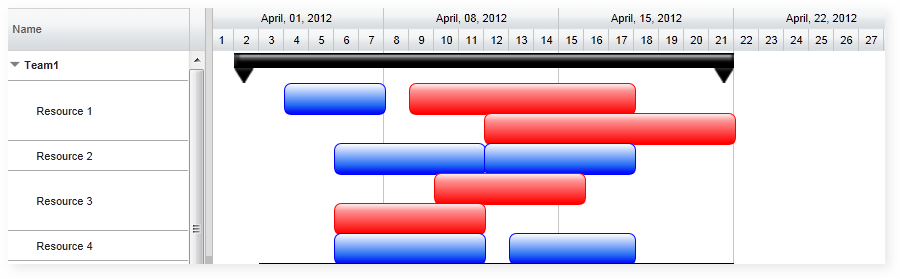
Row Heights varying based on overlapped state of bars
This is illustrated in this samples:
In HTML : ..\Samples\OverlappedTasksChangingRowHeights.htm.
In ASP.NET MVC : ..\Views\Home\FlexyGantt\OverlappedTasksChangingRowHeights.cshtml.
In ASP.NET : ..\Samples\FlexyGantt\OverlappedTasksChangingRowHeights.aspx.
MarginForBars
This static property controls the top and bottom margin of the taskbar in FlexyGantt. by default its 2. you must set this before FlexyGantt created
|
RadiantQ.FlexyGantt.TaskItemControl.MarginForBars = 4; // FlexyGantt creation. |
FlexyGanttResourceView
MarginForBars set to 4
© RadiantQ 2022. All Rights Reserved.