|
RadiantQ jQuery Gantt Package
TaskBarBackgroundTemplate
|   |
|
RadiantQ jQuery Gantt Package
TaskBarBackgroundTemplate
| |
TaskBarBackgroundTemplate
It's common to customize the look and feel of a task bar with custom task backgrounds to visualize more information available in the bound objects.
For example, there could be a base line start and end properties in your bound list elements that you want to visualize in the gantt chart just so you know which tasks went past-due.
You might want to visualize such tasks that went past-due with a "red bar" indicating the planned end time for such tasks.
To achieve this first define a TaskBarBackgroundTemplate.
This property in the GanttControl lets you define the UI for your custom task background.
|
// Custom template to indicate tasks that went past due // Note that a GanttTaskItemBar widget options will be the DataContext for all those UI elements, // So, you can refer to it's properties in the binding code below, // 1) To refer to a property in the IActivity instance, the binding expression will look like this: // "${ActivityView.Activity.StartTime}" // 2) The refer to a property in the underlying data source, the binding expression will look like this: // "${ActivityView.Activity.DataSource.PlannedEndTime}" var taskBarBGTemplate = '<div class="baseline-style" style="width: ${widthConverter(data)}; margin:${leftConverter(data)}" title="${taskBarBGTmplTooltip(data)}"></div>'; $ganttControl.GanttControl({ ProjectStartDate: anchorTime, DataSource: self.jsonData, AnchorTime: anchorTime, TaskBarBackgroundTemplate: baseLineTemplate }); |
|
In ASP.NET MVC |
|
@Html.JQProjectGantt( new JQProjectGanttSettings() { ControlId = "gantt_container", AfterGanttWidgetInitializedCallback = "AfterGanttWidgetInitializedCallback", DataSourceUrl = new Uri("/Home/GanttControlItemSource", UriKind.RelativeOrAbsolute), Options = new ProjectGanttOptions() { IDBinding = new Binding("ID"), NameBinding = new Binding("Name"), IndentLevelBinding = new Binding("IndentLevel"), StartTimeBinding = new Binding("StartTime"), EffortBinding = new Binding("Effort"), PredecessorIndicesBinding = new Binding("PredecessorIndices"), ProgressPercentBinding = new Binding("ProgressPercent"), DescriptionBinding = new Binding("Description"), TaskBarBackgroundTemplate = "<div class='baseline-style' style='width: ${widthConverter(data)}; margin:${leftConverter(data)}' title='${taskBarBGTmplTooltip(data)}'></div>", GanttChartOptions = new GanttChartOptions() { AnchorTime = DateTime.Today } } } ) |
|
In ASP.NET |
|
<RQ:GanttControl ID="gantt" DataSourceUrl="../../TaskListHandler.ashx" TaskBarBackgroundTemplate="<div class='baseline-style' style='width: ${widthConverter(data)}; margin:${leftConverter(data)}' title='${ taskBarBGTmplTooltip(data)}'></div>" AfterGanttWidgetInitializedCallback="this.AfterGanttWidgetInitializedCallback" LocalizationResourceFilePath="../../Src/ResourceStrings/" Height="500px" runat="server" /> |
And the leftConverter and widthConverter would look like this:
|
// Calculating the width of the TaskBarBackgroundTemplate function widthConverter(data) { var ganttChart = data.GanttChart; var DataSource = data.ActivityView.Activity_M().DataSource_M(); var plannedStart = DataSource.PlannedStartTime; var plannedEnd = DataSource.PlannedEndTime; // Use this utility in GanttChart to determine the location of the past due bar. var rightX = plannedEnd ? ganttChart.ConvertTimeToX(plannedEnd) : 0; var leftX = plannedStart ? ganttChart.ConvertTimeToX(plannedStart) : 0; return (rightX - leftX) + "px"; } // Calculating the left margin for TaskBarBackgroundTemplate function leftConverter(data) { var ganttChart = data.GanttChart; var plannedStart = data.ActivityView.Activity.DataSource.PlannedStartTime; // Return the setting for the margin. return "1px 0px 1px " + (plannedStart ? ganttChart.ConvertTimeToX(plannedStart) : 0) + "px"; } // Using the bound data in tooltip for TaskBarBackgroundTemplate function taskBarBGTmplTooltip(data) { data.rendered = function () { $(this.nodes).tooltip({ content: function (val) { var toolTipDateformat = 'dd-MMM-yyyy'; var ds = data("tmplItem").data.ActivityView.Activity_M().DataSource_M(); var PStartTime = ds.PlannedStartTime.toString(toolTipDateformat); var PEndTime = ds.PlannedEndTime.toString(toolTipDateformat); return "<div align='center'><span style='font-weight:bold'>BaseLine</span></div><div><span style='font-weight:bold'>Start:</span> " + PStartTime + "</div><div><span style='font-weight:bold'>End:</span> " + PEndTime + "</div>"; } }); } return ""; } |
The above settings will result in the gantt tasks rendered with baseline bars.
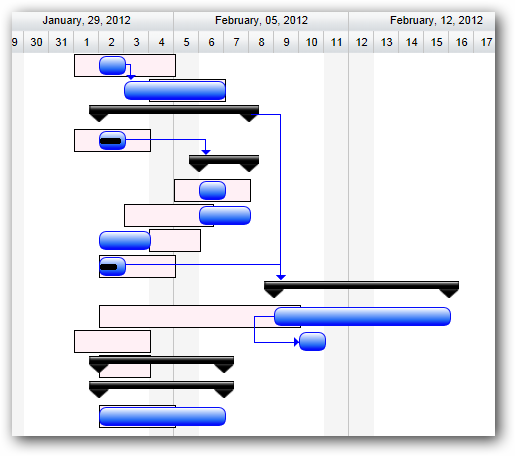
Baseline indicated using background template
This is illustrated in this samples:
In HTML : ..\Samples\GanttControlTemplateSample1.htm.
In ASP.NET MVC : ..\Views\Home\ProjectGantt\GanttControlTemplateSample1.cshtml.
In ASP.NET : ..\Samples\ProjectGantt\GanttControlTemplateSample1.aspx.
© RadiantQ 2022. All Rights Reserved.