|
RadiantQ jQuery Gantt Package
Critical Paths
|   |
|
RadiantQ jQuery Gantt Package
Critical Paths
| |
A project's Critical Path is defined by a list of tasks whose delay will directly or indirectly affect the project's finish date. An activity could indirectly affect the project finish date because of the presence of dependencies that would in turn affect other activities move past the current project end time.
It's often required to highlight such critical activities for proper project planning.
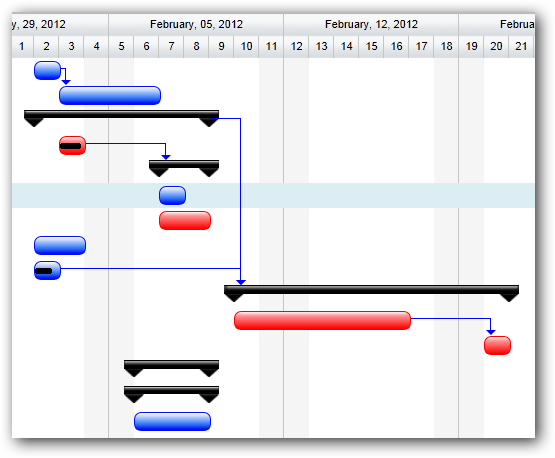
Sample Gantt with critical path highlighted
The GanttControl provides built-in functionality to determine and visualize the critical path of the project.
Determining Critical Paths in code
The GanttControl.GetCriticalPathActivities method returns the list of activities that fall under the critical path. For example:
GetCriticalPathActivities(/*RQTimeSpan*/ timeBuffer);
The 1st argument above is a time-buffer which specifies how further away an activity should be from potentially affecting the project dead line. If an activity is within this time-buffer then it will also be classified as "critical".
Highlighting Critical Paths
To highlight critical path activities, first cache the critical path activities in a static array as follows:
|
var CriticalPathActivities = new Array(); // In Button_Click for example: // The first argument to GetCriticalPathActivities is a time-buffer which speifies the "safe distance" // that an activity's end time should be away from affecting the project deadline. CriticalPathActivities = $ganttControl.GetCriticalPathActivities(RQTimeSpan.Zero); $ganttControl.RedrawChartRows(); |
Then setup a binding that will provide custom color information for activities as follows:
|
var tTemplate = "<div class='rq-gc-taskbar' style='background-image:${UpdateBackgroundColorBinding(data)} !important; border-color:${ UpdateBorderColorBinding(data)} !important'><div id='GanttTaskBarLabel' class='rq-gc-taskbar-label'></div></div>"; function UpdateBackgroundColorBinding(data) { var isCritical = CriticalPathActivities.indexOf(data) != -1; // for background-image if (isCritical) return 'url(Images/redBar.png)'; return 'url(Src/Styles/Images/TaskBar.png)'; } function UpdateBorderColorBinding(data) { var isCritical = CriticalPathActivities.indexOf(data) != -1; // for background-color if (isCritical) return 'red'; return '#050DFA'; } |
The resultant Gantt screenshot is shown above.
This is illustrated in this samples:
In HTML : ..\Samples\GanttControlCriticalPath.htm.
In ASP.NET MVC : ..\Views\Home\ProjectGantt\GanttControlCriticalPath.cshtml.
In ASP.NET : ..\Samples\ProjectGantt\GanttControlCriticalPath.aspx.
© RadiantQ 2022. All Rights Reserved.