|
RadiantQ jQuery Gantt Package
Assignments VS Task Duration
|   |
|
RadiantQ jQuery Gantt Package
Assignments VS Task Duration
| |
Effort Driven Scheduling
By default, When multiple resources are assigned to a task the task's duration is automatically reduced to reflect the multiple assignments.
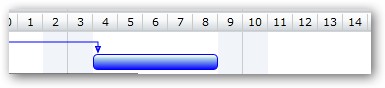
Duration before resource assignment
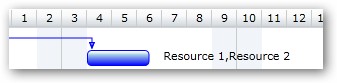
Duration after resource assignment
When a resource has a custom schedule then the following logic is used to calculate the duration of the task. Similarly when a task is assigned a resource partially:
- Divide the task's effort equally between all the assigned resources.
- Compute the required duration for each resource to complete their assigned portion.
- The task's duration will be the largest of these individual resource-durations.
Fixed Duration Scheduling
Alternatively you can turn off this behavior and prevent the duration from changing when multiple resources are assigned by setting this:
|
In HTML |
|
$gantt_container.GanttControl({ DataSource: jsonData, AdjustDurationOnAssignment: false,
}); |
|
In ASP.NET MVC |
|
@Html.JQProjectGantt( new JQProjectGanttSettings() { ControlId = "gantt_container", DataSourceUrl = new Uri("/Home/GanttControlItemSource", UriKind.RelativeOrAbsolute), Options = new ProjectGanttOptions() { AdjustDurationOnAssignment = false } }); |
|
In ASP.NET |
|
<RQ:GanttControl ID="gantt" AdjustDurationOnAssignment="false" DataSourceUrl="../../TaskListHandler.ashx" runat="server" > </RQ:GanttControl> |
This is illustrated in this samples:
In HTML : ..\Samples\GanttControlSkeletonWithResources.htm.
In ASP.NET MVC : ..\Views\Home\ProjectGantt\GanttControlSkeletonWithResources.cshtml.
In ASP.NET : ..\Samples\ProjectGantt\GanttControlSkeletonWithResources.aspx.
� RadiantQ 2022. All Rights Reserved.