|
RadiantQ jQuery Gantt Package
ContextMenus
|   |
|
RadiantQ jQuery Gantt Package
ContextMenus
| |
The FlexyGantt includes the following built-in context menus which are empty by default (so not shown when right clicked on). However you can add custom items into it based on the context.
But to begin with you have a couple of options to select a context menu framework that the FlexyGantt should work with. See this topic for more information on this.
FlexyTable Row Context Menu
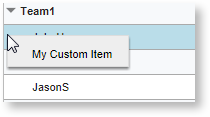
The table row context menu is shown when right clicking on the row in the FlexyTable. The built-in context menu is empty, but you can add custom items to it as shown below:
FlexyGantt Task Bar Context Menu
The FlexyGantt's task bar context menu is shown when right-clicking on the task bars in the FlexyGantt. The built-in context menu is empty, however you can add custom items into it based on the context.
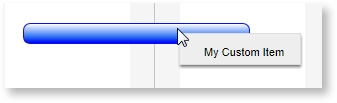
Here is the sample code snippet from the above:
|
var taskContextMenu = $('#container').data("FlexyGantt").TaskContextMenu; taskMenuItems = [ { keyName: "MyCustomItem", name: "My Custom Item", icon: "My Custom Item", callback: function (key, opt) { var dataContext = opt.$trigger[0].DataContext; alert("TaskInfo context : TaskName: " + dataContext.TaskName + ", StartTime: " + dataContext.StartTime); } } ] taskContextMenu.AddNewItems(taskMenuItems); var tableContextMenu = $('#container').data("FlexyGantt").TableContextMenu; tableMenuItems = [ { keyName: "MyCustomItem", name: "My Custom Item", icon: "My Custom Item", callback: function (key, opt) { var dataContext = grid.GetDataFromRow(opt.$trigger[0]); alert("FlexyTable row context : Resource: " + (dataContext.Data().RName || dataContext.Data().TName)); } } ] tableContextMenu.AddNewItems(tableMenuItems); |
This is illustrated in this samples:
In HTML : ..\Samples\CustomizingMenus.htm.
In ASP.NET MVC : ..\Views\Home\FlexyGantt\CustomizingMenus.cshtml.
In ASP.NET : ..\Samples\FlexyGantt\CustomizingMenus.aspx.
© RadiantQ 2022. All Rights Reserved.