|
RadiantQ jQuery Gantt Package
Gantt Look and Feel
|   |
|
RadiantQ jQuery Gantt Package
Gantt Look and Feel
| |
Splitter position
Often you want to show less of the table on the left and more of the chart on the right. This is easily implemented by setting the value to the TablePanelWidth option in FlexyGantt.
|
$( '#container' ).FlexyGantt( { TablePanelWidth: 500,//the default Value is 200 .... }); |
|
In ASP.NET MVC |
|
@Html.JQFlexyGantt( new JQFlexyGanttSettings() {
Options = new FlexyGanttOptions() { ... TablePanelWidth= 500, SpecialLineInfos = new System.Collections.ObjectModel.ObservableCollection<SpecialLineInfo>() { new SpecialLineInfo() { LineColor="green", LineDateTime=DateTime.Today.AddDays(1), ToolTipText="now" } }, GanttChartOptions = new GanttChartOptions() { AnchorTime = DateTime.Today, MovingInfoPopupID = "MovingInfoPopup", ResizeInfoPopupID = "ResizeInfoPopup",
} } } ) |
|
In ASP.NET |
|
<RQ:FlexyGantt ID="gantt" AfterDataRetrievedCallback="AfterDataRetrievedCallback" TablePanelWidth= "500" ../> |
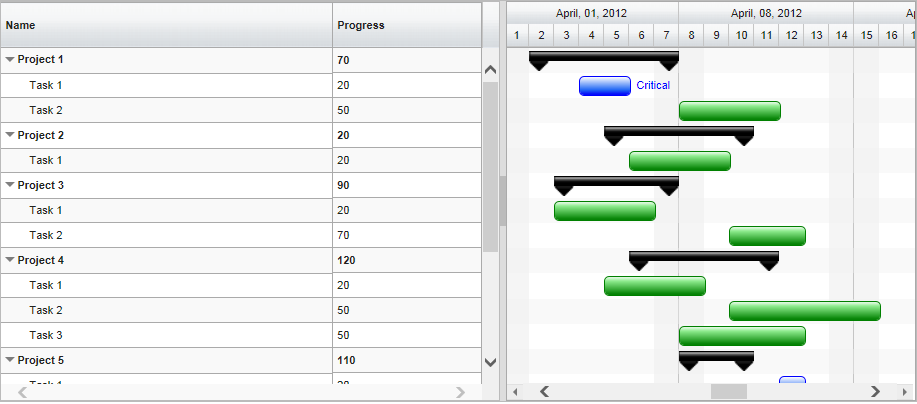
GanttTable Width is 500
Hiding the Grid
setting 0 to the TablePanelWidth will hide the GanttTable.
© RadiantQ 2022. All Rights Reserved.