|
RadiantQ jQuery Gantt Package
Task Bar Vertical Dragging
|   |
|
RadiantQ jQuery Gantt Package
Task Bar Vertical Dragging
| |
Task Bar Vertical Dragging
By default, the task bar can be dragged Horizontally from one time to another. But, there is also support for dragging the task bars vertically to support moving bars from one row to another.
You can turn on this feature with this boolean property:
|
RadiantQ.FlexyGantt.ShiftTrackerGlobal.IncludeVerticalMovingSupport = true; |
Once you turn on this feature, appropriate events will be raised as the user drags the bars around where you can determine if a drop is supported at a particular location and process the drop. These are the events raised that you should listen to:
|
RadiantQ.FlexyGantt.ShiftTrackerGlobal.BeginVerticalDrag.subscribe(function (sender, args) { // This event is raised before the starting of dragging. }); RadiantQ.FlexyGantt.ShiftTrackerGlobal.VerticalDragOver.subscribe(function (sender, args) { // This event is raised on the process of dragging. }); RadiantQ.FlexyGantt.ShiftTrackerGlobal.VerticalDragDrop.subscribe(function (sender, args) { // This event is raised after you dropped over the row. }); |
Among other things you can implement a drag cursor that can be shown at the drop location as the user drag a bar around, as follows:
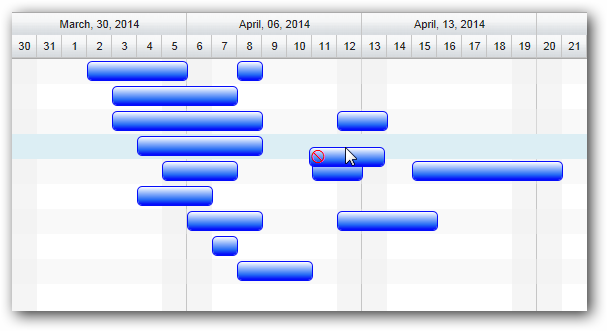
Dragging a bar with a special no-drop cue
This feature is illustrated in the following sample:
In HTML : ..\Samples\SingleGanttTaskDandD.htm.
In ASP.NET MVC : ..\Views\Home\FlexyGantt\SingleGanttTaskDandD.cshtml.
In ASP.NET : ..\Samples\FlexyGantt\SingleGanttTaskDandD.aspx.
© RadiantQ 2022. All Rights Reserved.