|
RadiantQ jQuery Gantt Package
Resource Load View
|   |
|
RadiantQ jQuery Gantt Package
Resource Load View
| |
The Gantt library now includes some utility classes that helps you compute the resources' load over a specific time span, take that information and build a resource load view using or FlexyGantt.
ResourceLoadTracker is the utility class that is capable of providing you load information for a resource given a GanttControl's Model instance.
Here is the Resource Load View (at the bottom) built using the above ResourceLoadTracker and the FlexyGantt.
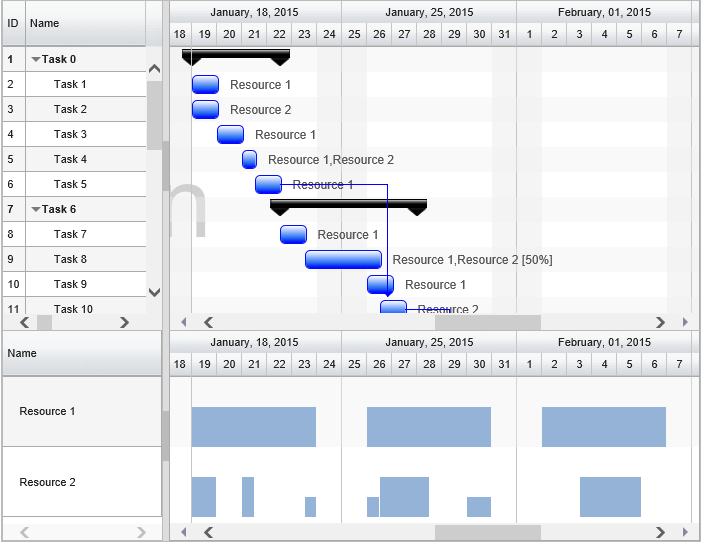
Resource Load View
This sample that illustrates this feature can be located here in the install:
In HTML : ..\Samples\ResourceLoadView.htm.
In ASP.NET MVC : ..\Views\Home\ProjectGantt\ResourceLoadView.cshtml.
In ASP.NET : ..\Samples\ProjectGantt\ResourceLoadView.aspx.
Step 1: ResourceLoadTracker
When you are ready to get the load information from the ResourceLoadTracker, you can do as follows:
|
var model = ganttControl.Model; var _loadTracker = new RadiantQ.Gantt.Model.ResourceLoadTracker(model); $flexyGantt_container.FlexyGantt({ DataSource: _loadTracker.ResourceLoadLists_M().asArray }); |
Initialize the tracker with the following:
Model instance - the tracker then builds the load information for all the Resources that are currently in the Model.
Then simply assign the ResourceLoadLists as the FlexyGantt's ItemsSoruce as above.
Note that the above list contains a ResourceLoadList instance for each Resource in the GanttControl's Model.
A ResourceLoadList then contains the load information as an array of LoadInfo instances (LoadInfos property) like this :
{
TimePeriod: 1/15/2014 8AM - 2/15/2014 4PM;
LoadPerc: 110; // A double value
},
etc.
Step 2: Customizing FlexyGantt
Apply appropriate templates to the FlexyGantt to make it show the load information as bars within the time ranges.
|
// The template that defines the look for the task bars. "rq-gc-taskbar" is a built-in style that defines a default look for the task bars. var tTemplate = "<div class='taskBar' style=\"background-color: ${UpdateBackgroundColorBinding(data)}; !important; height:${UpdateHeightBinding(data)} !important; margin-top:${UpdateTopMargin(data)} !important;\"></div>"; $flexyGantt_container = $('#flexyGantt_container'); $flexyGantt_container.FlexyGantt({ TaskItemTemplate: tTemplate, TaskEndTimeProperty: "TimePeriod.End", TasksListProperty: "LoadInfos", ............ ........ }); |
Note that the height and color of the bars is bound to the LoadPerc value in the TaskItemTemplate above.
The required converters are implemented in the above mentioned sampled.
� RadiantQ 2022. All Rights Reserved.