|
RadiantQ jQuery Gantt Package
Custom Chart Background
|   |
|
RadiantQ jQuery Gantt Package
Custom Chart Background
| |
CustomBackgroundRanges
Often you might want to "mark" certain time-ranges in the gantt with a custom background to indicate phases or stages in the project. This can be implemented using an API like below. Note that you can either add discreet set of ranges or provide "repeating ranges" via an event.
(This code is from the sample "...Samples\CustomChartBackgroundRanges")
|
$(document).ready( function () { var cgcb = self.CreateCustomChartBackgroundRanges(); ....... var $gantt_container = $("#gantt_container"); // Initialize the FlexyGantt widget. $gantt_container.FlexyGantt({ CustomChartBackgroundRanges: cgcb, ... } ); } ); // Provides custom range info function CreateCustomChartBackgroundRanges() { var customRangesInfos = new RadiantQ.Gantt.CustomRangesInfos(); var repeatingRange= RadiantQ.Template("<div class='repeatingRange' style='background-color:\\#eaefe4;'><div class='childDiv'>" + this.stringToNewLineChart('Repeating Range') + "</div></div>"); var phase1 = RadiantQ.Template("<div class='phase1' style='background-color:\\#c6d8b1;'><div class='childDiv'>" + this.stringToNewLineChart('Region 1') + "</div></div>"); var phase2 = RadiantQ.Template("<div class='phase1' style='background-color:\\#c6d8b1;'><div class='childDiv'>" + this.stringToNewLineChart('Region 2') + "</div></div>"); // Discreet Ranges customRangesInfos.DiscreetCustomRanges.add(new RadiantQ.Gantt.CustomRangeInfo(new Date(2014, 10, 20, 6, 0, 0), new Date(2014, 10, 20, 10, 0, 0), phase1)); customRangesInfos.DiscreetCustomRanges.add(new RadiantQ.Gantt.CustomRangeInfo(new Date(2014, 10, 20, 12, 0, 0), new Date(2014, 10, 20, 16, 0, 0), phase2)); customRangesInfos.ProvideRepeatingCustomRanges.subscribe(ProvideRepeatingCustomRangesEvent); function ProvideRepeatingCustomRangesEvent(sender, args) { var viewSpan = new RQTimeSpan(args.ViewEndTime - args.ViewStartTime); // Don't provide repeating ranges above certain zoom levels. if (viewSpan.getTotalDays() > 5) return; var start = args.ViewStartTime.Date().clone(); while (start < args.ViewEndTime) { var end = start.clone().addHours(5); args.CustomRanges.push(new RadiantQ.Gantt.CustomRangeInfo(start.clone(), end.clone(), repeatingRange)); start = start.clone().addDays(1); } } return customRangesInfos; } |
In ASP.NET MVC
|
<script type="text/javascript"> // Provides custom range info function CreateCustomChartBackgroundRanges() { var customRangesInfos = new RadiantQ.Gantt.CustomRangesInfos(); var repeatingRange = RadiantQ.Template("<div class='repeatingRange' style='background-color:\\#eaefe4;'><div class='childDiv'>" + this.stringToNewLineChart('Repeating Range') + "</div></div>"); var phase1 = RadiantQ.Template("<div class='phase1' style='background-color:\\#c6d8b1;'><div class='childDiv'>" + this.stringToNewLineChart('Region 1') + "</div></div>"); var phase2 = RadiantQ.Template("<div class='phase1' style='background-color:\\#c6d8b1;'><div class='childDiv'>" + this.stringToNewLineChart('Region 2') + "</div></div>"); // Discreet Ranges var today=new Date().Date(); customRangesInfos.DiscreetCustomRanges.add(new RadiantQ.Gantt.CustomRangeInfo(new Date(today.clone().addHours(6)), new Date(today.clone().addHours(10)), phase1)); customRangesInfos.DiscreetCustomRanges.add(new RadiantQ.Gantt.CustomRangeInfo(new Date(today.clone().addHours(12)), new Date(today.clone().addHours(16)), phase2)); customRangesInfos.ProvideRepeatingCustomRanges.subscribe(ProvideRepeatingCustomRangesEvent); function ProvideRepeatingCustomRangesEvent(sender, args) { var viewSpan = new RQTimeSpan(args.ViewEndTime - args.ViewStartTime); // Don't provide repeating ranges above certain zoom levels. if (viewSpan.getTotalDays() > 5) return; var start = args.ViewStartTime.Date().clone(); while (start < args.ViewEndTime) { var end = start.clone().addHours(5); args.CustomRanges.push(new RadiantQ.Gantt.CustomRangeInfo(start.clone(), end.clone(), repeatingRange)); start = start.clone().addDays(1); } } return customRangesInfos; } </script> @Html.JQProjectGantt( new JQProjectGanttSettings() { ControlId = "gantt_container", AfterGanttWidgetInitializedCallback="AfterGanttWidgetInitializedCallback", DataSourceUrl = new Uri("/Home/GanttControlItemSource_EffortInHours", UriKind.RelativeOrAbsolute), Options = new ProjectGanttOptions() { BaseTimeUnitWidth = 20, RowHeight = 25, TimeScaleHeaders = new TimeScaleHeaderDefinitions(){ new TimeScaleHeaderDefinition(){ Type = TimeScaleType.Days, Name="daysHeader", TextFormat="dd MMMM", }, new TimeScaleHeaderDefinition(){ Type = TimeScaleType.Hours, Name="hourHeader" } }, CustomChartBackgroundRanges = "CreateCustomChartBackgroundRanges", TimeRangeHighlightBehavior= TimeRangeHighlightBehavior.HighlightInChartOnHeaderMouseHover, WorkTimeSchedule = null, GanttChartOptions = new GanttChartOptions() { AnchorTime = DateTime.Today } } }) |
|
|
In ASP.NET
|
<script type="text/javascript"> // Provides custom range info function CreateCustomChartBackgroundRanges() { var customRangesInfos = new RadiantQ.Gantt.CustomRangesInfos(); var repeatingRange = RadiantQ.Template("<div class='repeatingRange' style='background-color:\\#eaefe4;'><div class='childDiv'>" + stringToNewLineChart('Repeating Range') + "</div></div>"); var phase1 = RadiantQ.Template("<div class='phase1' style='background-color:\\#c6d8b1;'><div class='childDiv'>" + stringToNewLineChart('Region 1') + "</div></div>"); var phase2 = RadiantQ.Template("<div class='phase1' style='background-color:\\#c6d8b1;'><div class='childDiv'>" + stringToNewLineChart('Region 2') + "</div></div>"); // Discreet Ranges var today=new Date().Date(); customRangesInfos.DiscreetCustomRanges.add(new RadiantQ.Gantt.CustomRangeInfo(new Date(today.clone().addHours(6)), new Date(today.clone().addHours(10)), phase1)); customRangesInfos.DiscreetCustomRanges.add(new RadiantQ.Gantt.CustomRangeInfo(new Date(today.clone().addHours(12)), new Date(today.clone().addHours(16)), phase2)); customRangesInfos.ProvideRepeatingCustomRanges.subscribe(ProvideRepeatingCustomRangesEvent); function ProvideRepeatingCustomRangesEvent(sender, args) { var viewSpan = new TimeSpan(args.ViewEndTime - args.ViewStartTime); // Don't provide repeating ranges above certain zoom levels. if (viewSpan.getTotalDays() > 5) return; var start = args.ViewStartTime.Date().clone(); while (start < args.ViewEndTime) { var end = start.clone().addHours(5); args.CustomRanges.push(new RadiantQ.Gantt.CustomRangeInfo(start.clone(), end.clone(), repeatingRange)); start = start.clone().addDays(1); } } return customRangesInfos; } </script> <RQ:GanttControl ID="gantt" DataSourceUrl="../../DataSources/TaskListHandler.ashx" TimeRangeHighlightBehavior="HighlightInChartOnHeaderMouseHover" Height="500px" runat="server"> <TimeScaleHeaders> <GanttBase:TimeScaleHeaderDefinition Type="Days" Name="daysHeader" TextFormat="dd MMMM" /> <GanttBase:TimeScaleHeaderDefinition Type="Hours" Name="hoursHeader"/> </TimeScaleHeaders> </RQ:GanttControl> |
Here is the resultant gantt with custom background ranges:
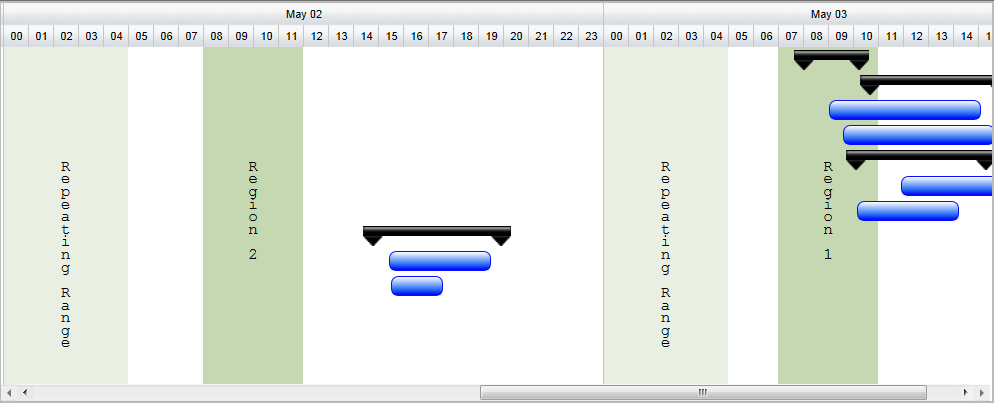
GanttChart with custom background ranges
This is illustrated in this samples:
In HTML : ..\Samples\CustomChartBackgroundRanges.htm.
In ASP.NET MVC : ..\Views\Home\Common\CustomChartBackgroundRanges.cshtml.
In ASP.NET : ..\Samples\Common\CustomChartBackgroundRanges.aspx.
© RadiantQ 2022. All Rights Reserved.