|
RadiantQ jQuery Gantt Package
Binding to Resource Objects
|   |
|
RadiantQ jQuery Gantt Package
Binding to Resource Objects
| |
Resources objects
Often in your business layer, resources are probably represented as a list of instances of a complex type with various properties. Assign this list to the gantt as follows:
|
In HTML |
|
$('#container').GanttControl({ .... .... ResourceItemsSource: new Array({ ResourceID: 1, ResourceName: "Resource 1" }, { ResourceID: 2, ResourceName: "Resource 2" }), ResourceIDBinding: new RadiantQ.BindingOptions("ResourceID"), ResourceNameBinding: new RadiantQ.BindingOptions("ResourceName") }); |
|
In ASP.NET MVC |
|
<%= Html.JQProjectGantt( new JQProjectGanttSettings() { ControlId = "gantt_container", Options = new ProjectGanttOptions() {
ResourceItemsSource = new List<ResourceInfo>(){ new ResourceInfo(){ ResourceID=1,ResourceName="Resource 1"}, new ResourceInfo(){ ResourceID=2,ResourceName="Resource 2" }}, } })%> |
|
In ASP.NET |
|
<script runat="server"> protected void gantt_Load(object sender, EventArgs e) { this.gantt.ResourceItemsSource = new List<ASPNetGanttDemo.DataSources.ResourceInfo>() { new ASPNetGanttDemo.DataSources.ResourceInfo(){ ResourceID = 1, ResourceName = "Resource 1" }, new ASPNetGanttDemo.DataSources.ResourceInfo(){ ResourceID = 2, ResourceName = "Resource 2", CustomScheduleString = "Mon 8:00:00 16:00:00;Tue 8:00:00 16:00:00;Wed 8:00:00 16:00:00" }, new ASPNetGanttDemo.DataSources.ResourceInfo(){ ResourceID = 3, ResourceName = "Resource 3" } }; this.gantt.ResourceIDBinding = new RadiantQ.Web.JQGantt.Common.Binding("ResourceID"); this.gantt.ResourceNameBinding = new RadiantQ.Web.JQGantt.Common.Binding("ResourceName"); } </script> <RQ:GanttControl ID="gantt" OnLoad="gantt_Load" /> |
For ASP.NET and ASP.NET MVC, have to create a ResourceInfo type in you project.
|
public class ResourceInfo { /// <summary> /// The name of the resource. Typically referenced in the GanttControl.ResourceNameBinding property. /// </summary> public string ResourceName { get; set; } /// <summary> /// The unique id of the resource. Typically referenced in the GanttControl.ResourceIDBinding property. /// </summary> public int ResourceID { get; set; } /// <summary> /// A string that represents the custom schedule of this resource. Typically referenced in the GanttControl.ResourceScheduleBinding property. /// This is usually of the format "MON 08:30:00 12:30:00, 13:30:00 17:30:00; TUE 9:30:00 5:30:00; WED.....". Exclude days when resource will not be working. /// A 24 hour day is represented just as "MON" for example. /// </summary> public string CustomScheduleString { get; set; } /// <summary> /// A string that represents the custom schedule of this resource. Typically referenced in the GanttControl.ResourceScheduleBinding property. /// </summary> public string CustomSchedule { get; set; } } |
You should then specify how a resource be identified in the model as well as how it should be identified in the UI. You can do this as above.
With this setup the resources will be represented in the model as a comma separated list of resource ids, as follows:
|
In HTML |
|
// Bound task instance where the Resources property specifies the resource assignments. { Name: "Task 6", ID: 13, StartTime: new Date().addDays(2).Date(), Effort: new RQTimeSpan(0, 16, 0, 0, 0), Resources: "1, 2" }, |
|
In ASP.NET MVC And ASP.NET |
|
List<TaskInfo> taskItems = new List<TaskInfo> { new TaskInfo { Name = "Grand Child Task 1", ID = 6, IndentLevel = 2, Resources = "2,3", StartTime = dt, Effort = TimeSpan.Parse("08:00:00").ToString() }, ... }; |
To indicate to the GanttControl that the resource assignment information is in the property "Resources", setup this binding:
|
In HTML |
|
$('#container').GanttControl({ .... .... AssignedResourcesBinding: new RadiantQ.BindingOptions("Resources") }); |
|
In ASP.NET MVC |
|
<%= Html.JQProjectGantt( new JQProjectGanttSettings() { ControlId = "gantt_container", Options = new ProjectGanttOptions() { //You have to create a resource type in your controller AssignedResourcesBinding= Binding("Resources"), } })%> |
|
In ASP.NET |
|
<RQ:GanttControl ID="gantt" DataSourceUrl="../../DataSources/TaskListHandler.ashx" Height="500px" runat="server" > <AssignedResourcesBinding Property="Resources" /> </RQ:GanttControl> |
Due to the above ResourceNameBinding setup, the UI of the gantt will use the names of the resources rather than the id of the resources in the gantt chart as follows:
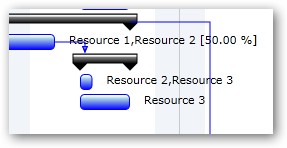
Resource names in gantt chart.
This is illustrated in this samples:
In HTML : ..\Samples\GanttControlSkeletonWithResources.htm.
In ASP.NET MVC : ..\Views\Home\ProjectGantt\GanttControlSkeletonWithResources.cshtml.
In ASP.NET : ..\Samples\ProjectGantt\GanttControlSkeletonWithResources.aspx.
� RadiantQ 2022. All Rights Reserved.