|
RadiantQ jQuery Gantt Package
XML Data
|   |
|
RadiantQ jQuery Gantt Package
XML Data
| |
Using XML Data
XML is another common way web services expose data to the client. Here is some code that shows how the XML data retrieved has to be "massaged" before binding it to the gantt.
|
$.ajax({ type: "GET", dataType: 'xml text', url: 'FlexyGanttData.xml', converters: { "xml text": function (data) { // We use te xml2json jquery plugin to convert xml to json. var json = $.xml2json(data).task; return $.parseJSON(window.JSON.stringify(json), true /*converts date strings to date objects*/ , true /*converts ISO dates to local dates*/ ); } }, success: function (data) { self.jsonData = data; $.holdReady(false); } }); |
And binding the above json list to the Gantt,
|
In HTML |
|
$gantt_container.FlexyGantt({ DataSource: self.jsonData, //the FlexyGantt is bound to resolve the hierarchy of Team/Resources/Tasks. resolverFunction: function (data) { // If data is wrapped by KO, then data itself could be a function and so we pick the object from the function. if (data["resource"] != undefined) { // While converting XML to JSON, if there is only one resource in the team then the xml2json utility funciton will make the resource a child of team object. Here we are // converting it to an array with 1 resource. if ($.isArray(data["resource"]) == false) { var res = data["resource"]; data["resource"] = new Array(res); } return data["resource"]; } else if (data["RName"] != undefined) { // While converting XML to JSON, if there is only one task in the resource then the xml2json utility funciton will make the resource a child of team object. Here we are // converting it to an array with 1 task. if (data["task"] != undefined) { if ($.isArray(data["task"]) == false) { var task = data["task"]; data["task"] = new Array(task); } return null; } else // Return an empty array to keep this a collapsible parent with no children. Return null to make this a leaf node. return new Array(); } return null; }, .... .... }); |
|
In ASP.NET MVC |
|
var AjaxSettings = { dataType: 'xml text', converters: { "xml text": function (data) { // We use te xml2json jquery plugin to convert xml to json. var json = $.xml2json(data).Project; for (var i = 0; i < json.length; i++) { var project = json[i]; var task = project['ArrayOfTask']["Task"] if (task) { if (task.length == undefined) json[i]["Tasks"] = new Array(json[i]['ArrayOfTask']["Task"]); else json[i]["Tasks"] = json[i]['ArrayOfTask']["Task"]; } } return $.parseJSON(window.JSON.stringify(json), true /*converts date strings to date objects*/ , true /*converts ISO dates to local dates*/ ); } } }; |
And pass the AjaxSettings to FlexyGantt,
|
In ASP.NET MVC |
|
@Html.JQFlexyGantt( new JQFlexyGanttSettings() { ControlId = "gantt_container", AfterGanttWidgetInitializedCallback = "AfterGanttWidgetInitializedCallback", DataSourceUrl = new Uri("/Home/GetFlexyGanttSkeletonXMLDataSource", UriKind.RelativeOrAbsolute), AjaxSettings = "AjaxSettings", Options = new FlexyGanttOptions() { HierarchyResolverFunction = "ResolverFunction", ...
} } ) |
|
In ASP.NET |
|
var AjaxSettings = { dataType: 'xml text', converters: { "xml text": function (data) { // We use te xml2json jquery plugin to convert xml to json. var json = $.xml2json(data).Project; for (var i = 0; i < json.length; i++) { var project = json[i]; var task = project['ArrayOfTask']["Task"] if (task) { if (task.length == undefined) json[i]["Tasks"] = new Array(json[i]['ArrayOfTask']["Task"]); else json[i]["Tasks"] = json[i]['ArrayOfTask']["Task"]; } } return $.parseJSON(window.JSON.stringify(json), true /*converts date strings to date objects*/ , true /*converts ISO dates to local dates*/ ); } } }; |
And pass the AjaxSettings to FlexyGantt,
|
In ASP.NET |
|
<RQ:FlexyGantt ID="gantt" ParentTaskEndTimeProperty="OverallEndTime" AfterGanttWidgetInitializedCallback="AfterGanttWidgetInitializedCallback" ParentTaskStartTimeProperty="OverallStartTime" TaskEndTimeProperty="EndTime" TaskStartTimeProperty="StartTime" AjaxSettings="AjaxSettings" .. /> |
>>>>
NOTE: If you are using namespaces in your XML (for example, <ns:StartTime>...</ns:StartTime>), then the above xml2json works slightly differently between browsers.
IE: In IE, the above element is referenced in the containing parent object with a property named "ns:StartTime".
Other browsers: The above element is referenced with a property named "StartTime".
To workaround this issue, you can determine what the property name would be by probing into your first task list item as follows:
|
// For eg: Using the namespace "ns" in xml, <task TaskName="Task 1" ns:StartTime="2012-04-03T00:00:00Z" EndTime="2012-04-12T00:00:00Z" Progress="20"></task> // In Firefox the property ends up being StartTime and in IE it's ns:StartTime; var taskStartTimeProperty = self.jsonData[0]["ns:StartTime"] ? "ns:StartTime" : "StartTime"; |
>>>>
Here is the resultant gantt:
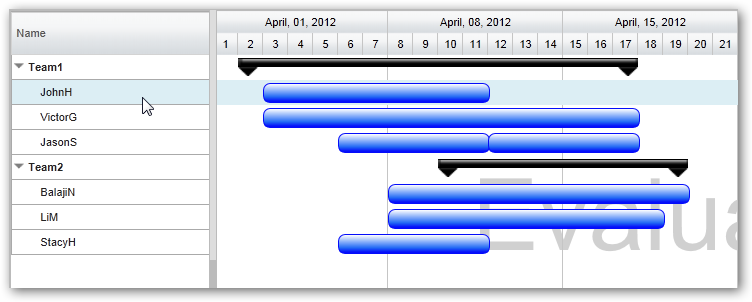
This is illustrated in this samples:
In HTML : ..\Samples\FlexyGanttBoundToXML.htm.
In ASP.NET MVC : ..\Views\Home\FlexyGanttBoundToXML.cshtml.
In ASP.NET : ..\Samples\ProjectGantt\FlexyGanttBoundToXML.aspx.
© RadiantQ 2022. All Rights Reserved.