|
RadiantQ jQuery Gantt Package
Using RadiantQ Binding
|   |
|
RadiantQ jQuery Gantt Package
Using RadiantQ Binding
| |
Why RadiantQ Binding?
RadiantQ Provides a highly customizable Binding engine which let you to bind the model,it improves performance of the Gantt, while comparing to other Binding engine with gantt and it does not require any model changes.
You will need data bindings only if you want some portions of the gantt to dynamically update it's UI when the underlying value changes. This is how dynamic updates are possible / setup in the grid and chart area of the gantt, in the absence of RadiantQ Binding:
Dynamic UI in the Grid Area
The grid cells as setup in our samples use our internal binding support to automatically listen to changes in the underlying activity's values and update itself. So, there is no need for bindings here.
Dynamic UI in the Chart Area
Take a look at the different ways to customize the look and feel of the task bars here using templates. While for the most part the templates allow you to customize the look based on the underlying activity's property values, they don't automatically redraw the bars when a value affecting the look of the bars change. Except by forcing a redraw of a bar manually.
Model Changes.
The Bound property should trigger the property changes event when it's value changes. Here is an example(if you are creating the model in project.)
|
function Task() { //the argument is optional. this.PropertyChanged = new ObjectEvent("PropertyChanged"); var cost = 1; Object.defineProperty(this, "Cost", { get: function () { return cost; }, set: function (newVal) { cost = newVal; // rise the PropertyChanged, in setter, to notify the property changes in bindings. this.PropertyChanged.raise(this, { PropertyName: "Cost", value: cost }); } }); //.. other property definition. } |
This is not a most common case, the data may come from different server or service in json format. In this case you don't have to create a brand new model for data to trigger the property changes instead of you can inject the get/set in data using the RadiantQ.Gantt.Utils.InjectGetAndSetOnData utility. Here is an example for that.
|
$.ajax({ type: "GET", dataType: 'json', url: 'GanttControlCostTracking.json', converters: { "text json": function (data) { return $.parseJSON(data, true /*converts date strings to date objects*/, true /*converts ISO dates to local dates*/, function (key, value) { if (key == "Cost") { //To inject get and set to trigger the property changed. RadiantQ.Gantt.Utils.InjectGetAndSetOnData(this, key); return value; } return value; }); } }, success: function (data) { //data - source for the ProjectGantt. } }); |
Note: Binding Activity's property doest not require the Get/set injection.
View Changes.
Binding should be specified using the data-bind attribute.
|
//TaskColor - The name of the custom binder. //Activity.DataSource.Cost - The name of the bound property. var taskTemplate = "<div class='rq-gc-taskbar' data-bind='TaskColor:Activity.DataSource.Cost' ><div id='GanttTaskBarLabel' class='rq-gc-taskbar-label'></div></div>"; // Initialize the FlexyGantt widget. $gantt_container.GanttControl({ TaskItemTemplate: taskTemplate, //..other options. }); |
Custom Binder.
|
//A custom binder which changes the task bar background-image based on the cost. RadiantQ.Binder.TaskColor = function ($elem, role, value, data) { this.element = $elem; this.value = value; this.data = data; //called while initializing the TaskColor binding. this.init = function () { var cost = value.getter(data); if (cost > 200) { this.element[0].style.setProperty('background-image', "url(Src/Styles/Images/greenBar.png)", "important"); this.element.css("border-color", "green", "!important"); } else { this.element[0].style.setProperty('background-image', "url(Src/Styles/Images/TaskBar.png)", "important"); this.element.css("border-color", "blue", "!important"); } } //called when cost is changed. this.refresh = function () { this.init(); } } |
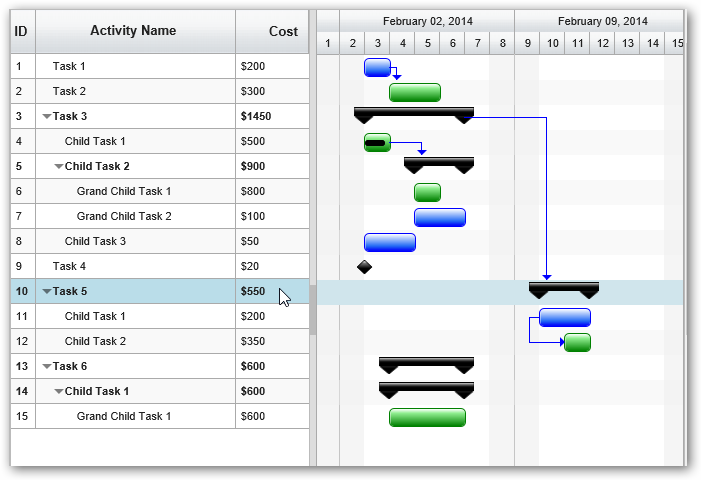
Project Gantt Custom task bar
© RadiantQ 2022. All Rights Reserved.