|
RadiantQ jQuery Gantt Package
Using Knockout
|   |
|
RadiantQ jQuery Gantt Package
Using Knockout
| |
Using Knockout(KO)
Knockout is a JavaScript library that helps you to create clean, rich, responsive display with a clean underlying data model - using an MVVM approach. Any time you have sections of UI that update dynamically (e.g., changing depending on the user�s actions or when the bound data source changes), KO can help you implement it more simply and maintainably.
Why Knockout in gantt?
By default Gantt has it own data binding utilities that are light-weight, providing templating support, observable collections, etc. These utilities can be used outside the gantt as well. So, you don't really need to use KO.
But, if your page has to use KO for any other reason, then you can use the same in the Gantt as well.
Gantt Setup with Knockout
To begin with add the JSON task list to the Knockout "view model" as follows:
|
viewModel = { Tasks: ko.mapping.fromJS(self.jsonData) }; |
And providing the collection into Gantt,
|
// The template that defines the look for the parent task bars. var pTemplate = "<div class='rq-gc-parentBar'><div class='rq-taskbar-dragThumb'></div><div class='rq-taskbar-resizeThumb'></div><div class='parentLeftPoly-style'></div><div class='parentMiddleBar-style'></div><div class='rq-gc-parentBar-rightCue'></div></div>"; // The template that defines the look for the task bars. "rq-gc-taskbar" is a built-in style that defines a default look for the task bars. var tTemplate = "<div class='rq-gc-taskbar'><div class='rq-taskbar-dragThumb'></div><div class='rq-taskbar-resizeThumb'></div></div>"; // Initialize the FlexyGantt widget. $('#container').FlexyGantt({ DataSource: viewModel.Tasks(), TaskStartTimeProperty: "StartTime", KnockoutObjectName="viewModel" .... .... }); |
|
In ASP.NET MVC |
|
@Html.JQFlexyGantt( new JQFlexyGanttSettings() { ControlId = "gantt_container", DataSourceUrl = new Uri("/Home/GetFlexyGanttItemSource", UriKind.RelativeOrAbsolute), Options = new FlexyGanttOptions() { KnockoutObjectName = "viewModel", ... } } ) |
|
In ASP.NET |
|
<RQ:FlexyGantt runat="server" ID="gantt" Height="500" HierarchyResolverFunction="ResolverFunction" TaskStartTimeProperty="StartTime" KnockoutObjectName = "viewModel" TaskEndTimeProperty="EndTime" ... /> |
Here is the resultant gantt:
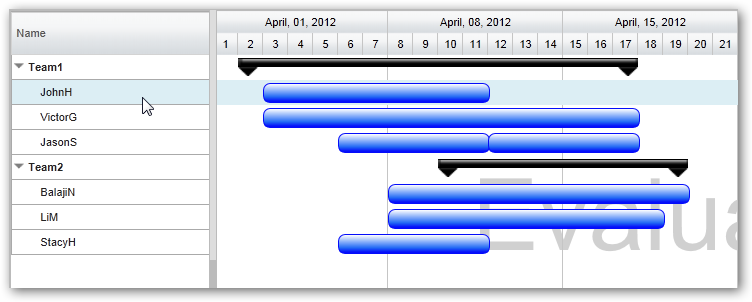
This is illustrated in this samples:
In HTML : ..\Samples\FlexyGanttUsingKO.htm.
In ASP.NET MVC : ..\Views\Home\ProjectGantt\FlexyGanttUsingKO.cshtml.
In ASP.NET : ..\Samples\ProjectGantt\FlexyGanttUsingKO.aspx.
© RadiantQ 2022. All Rights Reserved.