|
RadiantQ jQuery Gantt Package
In PHP
|   |
|
RadiantQ jQuery Gantt Package
In PHP
| |
Your First Gantt
Let us start with creating a new project directory, for example MyFirstGantt.
1) Gantt Widget Source JS files
To begin with, you need the JS Source files that are required by the Gantt Widget. These files are in the <install path>/Src folder. Simply copy over the whole Src folder into the above sample directory. This folder also has other dependant css files. You can delete the "Src/bin" folder as that's not required for this PHP sample.
Then copy over the PHP library files which are inside the <install path>/PlatformSamples/PHPSamples/lib folder into the sample directory.
2) Sample Utility JS files
Some JS files with utility functions that enables inline-editing in the grid, etc. are in the <install path>/Samples/Scripts folder. Copy over that entire Scripts directory as well into MyFirstGantt.
3) Sample JSON Data
Create a SampleData.json file containing a list of sample tasks to be displayed in the gantt.
SampleData.json content:
|
[{ "Name" : "Task 1", "ID" : 1, "StartTime" : "2012-02-02T00:00:00Z", "Effort" : "8:00:00", "Description" : "Description of Task 1" }, { "Name" : "Task 2", "ID" : 2, "PredecessorIndices" : "1", "StartTime" : "2012-02-03T00:00:00Z", "Effort" : "16:00:00", "Description" : "Description of Task 2" }, { "Name" : "Task 3", "ID" : 3, "StartTime" : "2012-02-02T00:00:00Z", "Effort" : "1.12:30:00", "ProgressPercent" : 90, "Description" : "Description of Task 3" }, { "Name" : "Child Task 1", "ID" : 4, "IndentLevel" : 1, "StartTime" : "2012-02-03T00:00:00Z", "Effort" : "8:00:00", "ProgressPercent" : 75, "Description" : "Description of Task 3/Child Task 1" }, { "Name" : "Child Task 2", "ID" : 5, "IndentLevel" : 1, "PredecessorIndices" : "4+8", "Description" : "Description of Task 3/Child Task 2" }, { "Name" : "Grand Child Task 1", "ID" : 6, "IndentLevel" : 2, "StartTime" : "2012-02-03T00:00:00Z", "Effort" : "8:00:00", "Description" : "Description of Task 3/Child Task 1/Grand Child 1" }, { "Name" : "Grand Child Task 2", "ID" : 7, "IndentLevel" : 2, "StartTime" : "2012-02-03T00:00:00Z", "Effort" : "16:00:00", "Description" : "Description of Task 3/Child Task 1/Grand Child 2" }, { "Name" : "Child Task 3", "ID" : 8, "IndentLevel" : 1, "StartTime" : "2012-02-02T00:00:00Z", "Effort" : "16:00:00", "Description" : "Description of Task 3/Child Task 3" }, { "Name" : "Task 4", "ID" : 9, "StartTime" : "2012-02-02T00:00:00Z", "Effort" : "00:00:00", "ProgressPercent" : 60, "Description" : "Description of Task 4" }, { "Name" : "Task 5", "ID" : 10, "StartTime" : "2012-02-02T00:00:00Z", "Effort" : "8:00:00", "PredecessorIndices" : "3+8", "Description" : "Description of Task 5" }, { "Name" : "Child Task 1", "ID" : 11, "IndentLevel" : 1, "StartTime" : "2012-02-02T00:00:00Z", "Effort" : "16:00:00", "Description" : "Description of Task 5/Child Task 1" }, { "Name" : "Child Task 2", "ID" : 12, "PredecessorIndices" : "11SS", "IndentLevel" : 1, "StartTime" : "2012-02-02T00:00:00Z", "Effort" : "8:00:00", "Description" : "Description of Task 5/Child Task 2" }, { "Name" : "Task 6", "ID" : 13, "StartTime" : "2012-02-02T00:00:00Z", "Effort" : "1.16:00:00", "Description" : "Description of Task 6" }, { "Name" : "Child Task 1", "ID" : 14, "IndentLevel" : 1, "StartTime" : "2012-02-02T00:00:00Z", "Effort" : "1.20:00:00", "Description" : "Description of Task 6/Child Task 1" }, { "Name" : "Grand Child Task 1", "ID" : 15, "StartTime" : "2012-02-04T00:00:00Z", "Effort" : "1.00:00:00", "IndentLevel" : 2, "Description" : "Description of Task 6/Child Task 2" }] |
4) PHP file including the Gantt Widget
Create a new PHP file inside the project directory (MyFirstGantt) and reference the following source files. Remember to link to the right version of the RadiantQ jQuery Gantt in the last reference below.
|
<!DOCTYPE html> <link href="Src/Styles/jQuery-ui-themes/smoothness/jquery-ui.css" rel="stylesheet" /> <link href="Src/Styles/radiantq.gantt.default.css" rel="stylesheet" /> <link href="Src/Styles/VW.Grid.css" rel="stylesheet" /> <script src="Src/Scripts/jquery-1.11.2.min.js" type="text/javascript"></script> <script src="Src/Scripts/jquery-ui-1.11.4/jquery-ui.min.js" type="text/javascript"></script> <script type="text/javascript" src="Src/Scripts/jquery.layout-latest.min.js"></script> <script src="Src/Scripts/Utils/date.js" type="text/javascript"></script> <script src="Src/ResourceStrings/en-US.js" type="text/javascript"></script> <script src='Src/Scripts/VW.Grid.1.min.js' type='text/javascript'></script> <script src='Src/Scripts/RadiantQ-jQuery.gantt.5.0.trial.min.js' type='text/javascript'></script>> <script src="Src/Scripts/RQGantt_Init.min.js" type="text/javascript"></script> <!-- It automatically includes required PHP gantt extension files--> require_once "lib/AutoLoad.php |
Creating Gantt
Initialize the GanttControl widget as follows within your PHP pages
|
<?php //Gantt Settings $ganttSetttings = new RadiantQ\Gantt\GanttSettings(); //GanttControl Options. $options= new RadiantQ\Gantt\ProjectGanttOptions(); $ganttSetttings->DataSourceUrl= "SampleData.json"; //column defintions $IDcolumn = new RadiantQ\Gantt\Column(); $IDcolumn->field= "Activity.ID"; $IDcolumn->title= "ID"; $IDcolumn->width= 40; $IDcolumn->iseditable=false;
$NameColumn = new RadiantQ\Gantt\Column(); $NameColumn->field="Activity.ActivityName"; $NameColumn->title= "Name"; $NameColumn->width= 200; $NameColumn->clientEditorTemplate= "projectGanttNameEditor"; $NameColumn->clientTemplate = "projectGanttNameTemplate";
$STColumn = new RadiantQ\Gantt\Column(); $STColumn->field="Activity.StartTime"; $STColumn->title= "StartTime"; $STColumn->width= 150; $STColumn-> format= "MM/dd/yy"; $STColumn->editor= "<input data-bind='ActivityTimeBinder:Activity_M().StartTime_M' />";
$ETColumn = new RadiantQ\Gantt\Column(); $ETColumn->field="Activity.EndTime"; $ETColumn->title= "EndTime"; $ETColumn->width= 150; $ETColumn->format= "MM/dd/yy"; $ETColumn->editor= "<input data-bind='value:Activity_M().EndTime_M' data-getvalueName='getDate' data-setvaluename='setDate' data-valueUpdate='onBlur' data-role=\"DateTimePicker\" />";
$EffortColumn = new RadiantQ\Gantt\Column(); $EffortColumn->field= "Activity.Effort"; $EffortColumn->title= "Effort"; $EffortColumn->format= "" /*to call the .toString()*/; $EffortColumn->template= '<div> ${ data.Activity_M().CumulativeEffort_M().toString() } </div>'; $EffortColumn->editor= "<input data-bind='value:Activity_M().Effort_M' data-role=\"DurationPicker\" />"; $EffortColumn->width= 100;
$ProgressColumn = new RadiantQ\Gantt\Column(); $ProgressColumn->field= "Activity.ProgressPercent"; $ProgressColumn->title="ProgressPercent"; $ProgressColumn->width= 100; $ProgressColumn->editor= "<input style='height:18px' data-bind='value:Activity.ProgressPercent' data-role=\"spinner\" data-options='{\"min\":0, \"max\": 100}' />";
$ResourceColumn = new RadiantQ\Gantt\Column(); $ResourceColumn->field= "Activity.Assignments"; $ResourceColumn->title= "Resource"; $ResourceColumn->iseditable=false; $ResourceColumn->template= "<div>\${RadiantQ.Gantt.ValueConverters.ConverterUtils.GetResourcesText(data.Activity_M().Assignments_M(), false)}</div>"; $ResourceColumn->editor= "<input data-bind='ResourcePickerBinder:Activity.Assignments' />"; $ResourceColumn->width= 200; $PredecessorColumn = new RadiantQ\Gantt\Column(); $PredecessorColumn->field= "Activity.PredecessorIndexString"; $PredecessorColumn->title= "PredecessorIndices"; $PredecessorColumn->template= "<div>\${data.PredecessorIndexString || '' }</div>"; $PredecessorColumn->editor= "<input data-bind='value:PredecessorIndexString' />"; $PredecessorColumn->width= 150;
$GanttTableOptions->columns = array($IDcolumn,$NameColumn,$STColumn,$ETColumn,$EffortColumn,$ProgressColumn,$ResourceColumn,$PredecessorColumn); //table initialization $options->GanttTableOptions = $GanttTableOptions; $options->ProjectStartDate=new DateTime("2012-02-02"); //Bindings $options->IDBinding =new RadiantQ\Gantt\Binding("ID"); $options->NameBinding =new RadiantQ\Gantt\Binding("Name"); $options->IndentLevelBinding =new RadiantQ\Gantt\Binding("IndentLevel"); $options->StartTimeBinding =new RadiantQ\Gantt\Binding("StartTime"); $options->EffortBinding =new RadiantQ\Gantt\Binding("Effort"); $options->PredecessorIndicesBinding =new RadiantQ\Gantt\Binding("PredecessorIndices"); $options->ProgressPercentBinding =new RadiantQ\Gantt\Binding("ProgressPercent");
//GanttChart options. $GanttChartOptions = new RadiantQ\Gantt\GanttChartOptions(); $GanttChartOptions->AnchorTime = new DateTime("2012-02-02"); $options ->GanttChartOptions = $GanttChartOptions;
$ganttSetttings->Options =$options; //Ganttcontrol initialization. $gantt = new RadiantQ\UI\GanttControl($ganttSetttings); //Setting attributes to Ganttcontrol element. $gantt->setStyleAttribute("height","500px"); $gantt->setStyleAttribute("width","100%"); $gantt->setAttribute("id","gantt_container"); //To render the ganttcontrol. echo $gantt->Render(); ?> //Name Template and editor <script id="projectGanttNameTemplate" type="text/x-jquery-tmpl"> <div class="rq-grid-expand-indentWidth" style="height: 1px; width: ${data.IndentWidth}px"></div> <div style="width: 12px; display: ${data.IsParent ? "block" :"none" }" class="arrowContainer"> <div onclick="ExpanderOnclick(this,event)" id="arrow" class="${ data.IsExpanded ? " rq-grid-expand-arrow rq-grid-collapse-arrow": "rq-grid-expand-arrow"} rq-Ignore-click"></div> </div> <div class="rq-grid-expander-text">${data.Activity.ActivityName}</div> </script> <script id="projectGanttNameEditor" type="text/x-jquery-tmpl"> <div class="rq-grid-expand-indentWidth" style="height: 1px; width: ${data.IndentWidth_M()}px"></div> <div style="width: 12px; display: ${data.IsParent_M() ? "block" :"none" }" class="arrowContainer"> <div onclick="ExpanderOnclick(this,event)" id="Div1" class="${ data.IsExpanded_M() ? " rq-grid-expand-arrow rq-grid-collapse-arrow": "rq-grid-expand-arrow"} rq-Ignore-click"></div> </div> <div class="rq-grid-expander-text"><input data-bind='value: Activity_M().ActivityName_M' /></div> </script> |
The content of your MyFirstGantt directory should look like this:
Open the FirstGanttSample.PHP in the browser and you should see this in the browser:
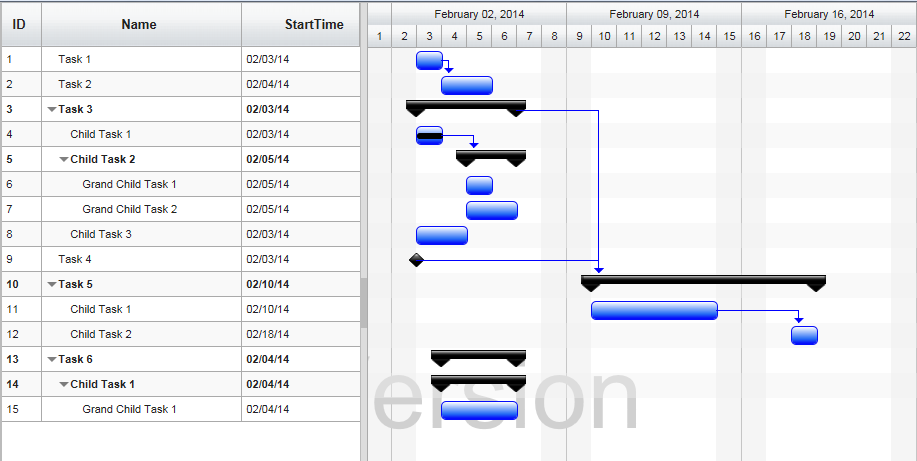
FirstGanttSample in browser
Finally, take a look at this topic that show how you can clean up the Src folder in your project to remove unnecessary files.
© RadiantQ 2022. All Rights Reserved.