|
RadiantQ jQuery Gantt Package
How to show different taskbars in single row?
|   |
|
RadiantQ jQuery Gantt Package
How to show different taskbars in single row?
| |
Sometime user wants to differentiate the tasks from the others tasks in a same row to represent and highlight the taks, Here It is possible to show the different type of taskbars in the single row of the GanttChart.
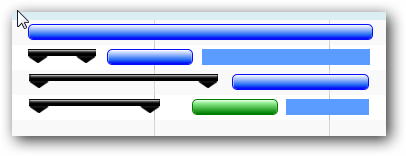
Customized Task Bars
sample json:
|
[ { "ResourceGroupName" : "Group1", "ResourceGroupID" : "Grp1", "Tasks": [ { "TaskName": "Task 1", "StartTime": "2014-04-02T00:00:00Z", "EndTime": "2014-04-09T08:00:00Z", "Type": "Order" }, .............. ], "Resources" : [ { "ResourceName" : "Resource1", "ResourceID" : "Res1", "Tasks": [ { "TaskName": "Task 2", "StartTime": "2014-04-03T00:00:00Z", "EndTime": "2014-04-09T06:00:00Z", "Type": "ProductionOrder" }, ................ ] }, ........... ] }, ...................... ] |
Sample Code:
|
// The template that defines the look for the task bars. "rq-gc-taskbar" is a built-in style that defines a default look for the task bars. And added some more elements as a child which contain the style of the parentbar. var tTemplate = "<div class='rq-gc-taskbar'><div class='rq-gc-parentBar-leftCue parentStyle'></div><div class='rq-gc-parentBar-middle parentStyle'></div><div class='rq-gc-parentBar-rightCue parentStyle'></div><div class='rq-taskbar-dragThumb'></div><div class='rq-taskbar-resizeThumb'></div><div class='start-resizeThumb'></div></div>"; // Setting the TaskItemTemplate and ParentTaskItemTemplate as same template. $gantt_container.FlexyGantt({ ........ ........ TaskItemTemplate: tTemplate, ParentTaskItemTemplate: tTemplate, OnTaskBarLoad: function (task) { // Check for the Type. if (this[0].DataContext.Type == "ProductionOrder") { //If it is "ProductionOrder" then Add new class to remove the TaskBarStyle to make the TaskBar like the ParentBar. $(this).addClass('customBarStyle'); } else { // If it is a Not a ProductionOrder then remove the child elements from the bar to show the TaskBar alone. $('.parentStyle', $(this)).remove(); //If it is "StockOrder" then Add new class to customize the taskbar if(this[0].DataContext.Type == "StockOrder") $(this).addClass('templatizedTaskbar'); //If it is "StockOrder" then Add new class to customize the taskbar if (this[0].DataContext.Type == "Maintenance") $(this).addClass('greenBarStyle'); } }, ........ ........ }); |
This is illustrated in this samples:
In HTML : ..\Samples\FlexyGanttTaskbarCustomization.htm.
In ASP.NET MVC : ..\Views\Home\FlexyGantt\FlexyGanttTaskbarCustomization.cshtml.
In ASP.NET : ..\Samples\FlexyGantt\FlexyGanttTaskbarCustomization.aspx.
© RadiantQ 2022. All Rights Reserved.