|
RadiantQ jQuery Gantt Package
GanttTable Column Editable Settings
|   |
|
RadiantQ jQuery Gantt Package
GanttTable Column Editable Settings
| |
Disable editing For a particular Column.
Set the iseditable to false in column definition.
|
{ field: "Activity.DataSource.Cost", title: "Cost", editor: "<input data-bind='value:Activity.DataSource.Cost' data-role=\"spinner\" />", template:"<div>${ToDollarString(data)}</div>", width: 100, iseditable: false }, |
Custom editing.
By default, the VWGrid provides you an input element for editing the value, which can of course be extended with a UI Widget. However, you can also make the VWGrid use a different element for editing the values, using the editor template. This is illustrated in the sample ...Samples/GanttControlTableCustomization.htm where we use a select html element to edit the value of the priority column.
|
RadiantQ.Binder.priorityEditor = function () { this.init = function($elem, role, value, data) { var source = ["Low", "Medium", "High"]; for (var i = 0; i < source.length; i++) { $elem.append("<option value=" + (i + 1) + ">" + source[i] + "</option>"); } //To set the value to select. $elem.val(value.getter(data)); //select change event. $elem.change(function () { //To update the boundobject. data.Activity.DataSource.Status.Priority = $(this).val(); }); } } // Column definition { field: "Activity.DataSource.Status.Priority", title: "Priority", width: 100, isParentEditable: false, // priorityEditor is a custom binder editor: "<select data-bind='priorityEditor:Activity.DataSource.Status.Priority' ></select>", template: "<div>${priorityTextConverter(data)}</div>" } |
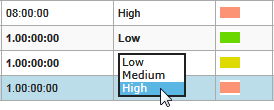
Using select html element to edit.
Enable Summary row Column Editable.
By default all Summary columns are not editable other than the name column. To allow editing, set the isParentEditable to true in the fcolumn definition.
|
var columns = [ ........... ........... { field: "Activity.StartTime", title: "StartTime", width: 150, isParentEditable: true, format: "MM/dd/yy", editor: "<input data-bind='ActivityTimeBinder:Activity.StartTime' />" }, ....... ....... ]; |
� RadiantQ 2022. All Rights Reserved.