|
RadiantQ jQuery Gantt Package
Dependencies
|   |
|
RadiantQ jQuery Gantt Package
Dependencies
| |
Activity Dependencies
Activities within a project could have dependencies on other activities. The dependent activity's start time is then constrained by the predecessor activity's times. The GanttControl supports these 4 different types of dependency constraints:
|
Dependency Type |
Constraint behavior |
|
FinishToStart (Default) |
The ToActivity's start time cannot be earlier than the FromActivity's end time. |
|
StartToStart |
The ToActivity's start time cannot be earlier than the FromActivity's start time. |
|
FinishToFinish |
The ToActivity's end time cannot be earlier than the FromActivity's end time. |
|
StartToFinish |
The ToActivity's end time cannot be earlier than the FromActivity's start time. |
There can also be a "lag" specified between the 2 times above.
A FinishToStart dependency between these 2 activities with a lag of 4 hours
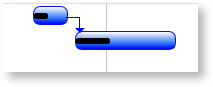
is represented as follows:
{TaskName="Task 1", TaskID="5" ....}
{TaskName="Task 2", TaskID="6", PredecessorIndices="5+4"}
The PredecessorIndices property indicates a dependency with activity ID "5" and a lag of "4 hours". "5-4" would correspond to a negative lag of "-4 hours". If you want this to be something else then set the LagStringUnitsInHours property appropriately (24, if you want it to indicate the number of days).
The dependency type is indicated with a corresponding suffix ("FS", "SF", "SS" or "FF") as follows:
{TaskName="Task 2", TaskID="6", PredecessorIndices="5SF"}
The above example indicates a StartToFinish dependency. Specifying the "FS" (Finish To Start) suffix is optional since that's the default.
Multiple predecessors
If an activity is constrained by more than 1 predecessor activity, then the dependency is represented as follows:
PredecessorIndices="4, 2, 9+3"
Simply separate the different predecessor activity IDs by commas.
Editing the Dependencies
End-users can simply drag and drop a connection line from one activity to another in the gantt chart to setup a dependency connection between the two. This results in the default FinishToStart type of dependency.
Validating the predecessor-dependency setting
During runtime the gantt control validates all predecessor settings before applying it. For example, a parent cannot be a predecessor to it's child. The gantt prevents applying such dependecy settings.
Preventing Dependency Constraints Conditionally
You can choose to prevent getting the dependency constraints applied on some activities, conditionally as follows, by listening to the ShouldEnforceDependencyConstraintsOnActivity event.
|
var $ganttControl = $gantt_container.data("GanttControl"); $ganttControl.ShouldEnforceDependencyConstraintsOnActivity.subscribe(Gantt_ShouldEnforceDependencyConstraints); // To prevent dependency constraints from shifting an activity that has already progressed. function Gantt_ShouldEnforceDependencyConstraints(sender, args) { if (args.Activity_M().ProgressPercent_M() > 0) args.Enforce = false; else args.Enforce = true; } |
© RadiantQ 2022. All Rights Reserved.