|
RadiantQ WPF Gantt
Task Item Adornments
|   |
|
RadiantQ WPF Gantt
Task Item Adornments
| |
Adornments within the task bar
Sometimes you will want to render icons, shapes, text, etc. right over the task bars to indicate status, for annotation, etc. This is easily done within the TaskItemTemplate which is discussed in this section.
Adornments outside the task bar
But, if you want to render adornments like icons, shapes, text, etc. outside the task bar, to the left, right or at a specific datetime location (to indicate deadline for example), you will have to use the TaskItemAdornerTemplate property.
For example, you might want to mark certain tasks with a "Critical" text to it's right as follows:
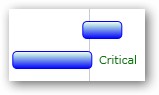
You can do so as explained below: (for the full source refer to the FlexyGantt\Appearance\FlexyGanttCustomTaskLook sample).
In your xaml:
<fxgantt:FlexyGantt ....>
<fxgantt:FlexyGantt.TaskItemAdornerTemplate>
<DataTemplate>
<TextBlock Foreground="Green" Text="Critical" HorizontalAlignment="Left" VerticalAlignment="Center"
Margin="{Binding Converter={StaticResource adornerMarginProvider}}" Visibility="{Binding Converter={StaticResource adornerVisibilityProvider}}" />
</DataTemplate>
</fxgantt:FlexyGantt.TaskItemAdornerTemplate>
</fxgantt:FlexyGantt>
The converters used in the Binding will look like this in code behind:
public class AdornerVisibilityProvider : IValueConverter
{
public object Convert(object value, Type targetType, object parameter, System.Globalization.CultureInfo culture)
{
// We want the adorners displayed only for objects of type Task....
if (value is Task)
{
Task task = value as Task;
// ... and for some "critical" tasks. For illustration we use a simple logic here.
if (task.EndTime < TimeComputingUtils.ToUtcKind(DateTime.Now))
return Visibility.Visible;
}
return Visibility.Collapsed;
}
}
public class AdornerMarginProvider : IValueConverter
{
// Initialize this from the Page's constructor:
public FlexyGantt FlexyGantt { get; set; }
public object Convert(object value, Type targetType, object parameter, System.Globalization.CultureInfo culture)
{
// We want the adorners displayed only for objects of type Task....
if (value is Task)
{
Task task = value as Task;
// ... and to the right of the endtime of the task:
double startX = this.FlexyGantt.GanttChart.ConvertTimeToX(task.EndTime) + 10;
return new Thickness(startX, 0, 0, 0);
}
return new Thickness();
}
}
� RadiantQ 2009 - 2019. All Rights Reserved.