|
RadiantQ WPF Gantt
Row Background Template
|   |
|
RadiantQ WPF Gantt
Row Background Template
| |
Row Background Template:
The TasksListRowBackgroundTemplate is used to render some custom UI elements in the background of the chart row.
For example, in the sample referenced below the resources corresponding to each row have a custom schedule representing their "non-working" hours and this is represented using gray rectangles.
The NonWorkingHoursRenderingCanvas is a utility available specifically for this purpose - visualize non-working hours in row-background. However, you can include your custom logic to visualize other kinds of time-information in the row background.
|
<fxgantt:FlexyGantt x:Name="fxgantt" Grid.Row="1" Grid.Column="1" ItemTemplate="{StaticResource TreeTemplate}" ........... > <fxgantt:FlexyGantt.TasksListRowBackgroundTemplate> <ControlTemplate> <!-- The DataContext for this template will be of type TasksListControl --> <ganttview:NonWorkingHoursRenderingCanvas Height="{Binding Height}" StartTime="{Binding GanttChart.ComputedStartTime}" EndTime="{Binding GanttChart.ComputedEndTime}" GanttChart="{Binding GanttChart}" Schedule="{Binding DataContext.Data.Schedule}" RectBrush="#88D3D3D3"/> </ControlTemplate> </fxgantt:FlexyGantt.TasksListRowBackgroundTemplate> </fxgantt:FlexyGantt> |
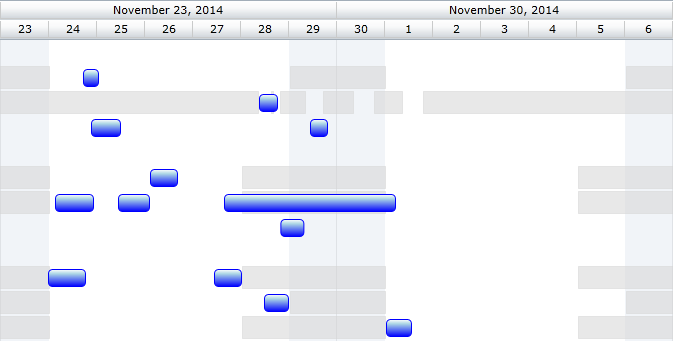
This feature is also illustrated in this sample that is part of the install:
<InstalledPath>\Samples\FlexyGantt\CustomSchedules\FlexyGanttCustomResourceLevelSchedules
� RadiantQ 2009 - 2019. All Rights Reserved.