|
RadiantQ WPF Gantt
Resource Load View
|   |
|
RadiantQ WPF Gantt
Resource Load View
| |
The Gantt library now includes some utility classes that helps you compute the resources' load over a specific time span, take that information and build a resource load view using our FlexyGantt.
ResourceLoadTracker is the utility class that is capably of providing you load information for a resource given a GanttControl's Model instance.
Here is the Resource Load View (at the bottom) built using the above ResourceLoadTracker and the FlexyGantt.
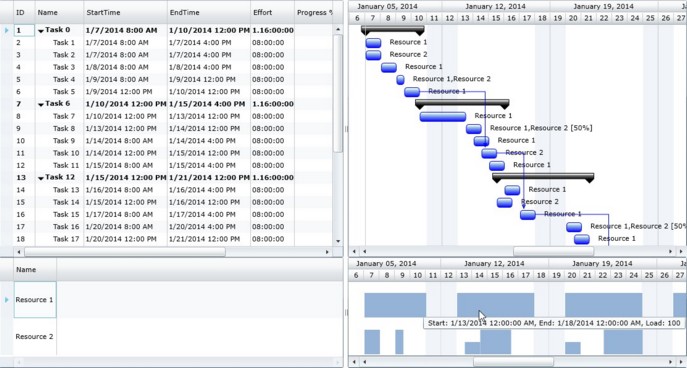
Resource Load View
This is illustrated in the sample <install path>\Samples\ProjectGantt\Scheduling\ResourceLoadView.
Step 1: ResourceLoadTracker
When you are ready to get the load information from the ResourceLoadTracker, you can do as follows:
private void Refresh_Click(object sender, RoutedEventArgs e)
{
this._loadTracker = new ResourceLoadTracker(this.ganttControl.Model, this.Dispatcher);
this.flexyGantt.ItemsSource = this._loadTracker.ResourceLoadLists;
}
Initialize the tracker with the following:
a) IGanttModel instance - the tracker then builds the load information for all the Resources that are currently in the Model.
b) Optional Dispatcher instance - Providing this, will make the tracker keep the load-information up to date as the resources get reassigned to tasks, etc.
Then simply assign the ResourceLoadLists as the FlexyGantt's ItemsSoruce as above.
Note that the above list contains a ResourceLoadList instance for each Resource in the GanttControl's Model.
A ResourceLoadList then contains the load information as an array of LoadInfo instances (LoadInfos property) like this :
{
TimePeriod: 1/15/2014 8AM - 2/15/2014 4PM;
LoadPerc: 110; // A double value
},
etc.
Step 2: Customizing FlexyGantt
Apply appropriate templates to the FlexyGantt to make it show the load information as bars within the time ranges.
<fxgantt:FlexyGantt RowHeight="60" TaskListBinding="{Binding LoadInfos}" TaskStartTimeBinding="{Binding TimePeriod.Start, Mode=OneWay}"
TaskEndTimeBinding="{Binding TimePeriod.End, Mode=OneWay}" TreeHeaderContent="Resources"
CustomSourceListViewTemplate="{StaticResource flexyGanttTableTemplate}">
<fxgantt:FlexyGantt.TaskItemTemplate>
<DataTemplate>
<Border ToolTipService.ToolTip="{Binding}" VerticalAlignment="Bottom" Background="{Binding LoadPerc, Converter={StaticResource loadToBrushConverter}}"
Height="{Binding LoadPerc, Converter={StaticResource loadToHeightConverter}}" >
</Border>
</DataTemplate>
</fxgantt:FlexyGantt.TaskItemTemplate>
</fxgantt:FlexyGantt>
Note that the height and color of the bars is bound to the LoadPerc value in the TaskItemTemplate above.
The required converters are implemented in the above mentioned sampled.
� RadiantQ 2009 - 2019. All Rights Reserved.