|
RadiantQ WPF Gantt
How to add row border in chart area?
|   |
|
RadiantQ WPF Gantt
How to add row border in chart area?
| |
How to add row border in chart area?
Sometimes we want to customize the GanttChart to include rows borders like this:
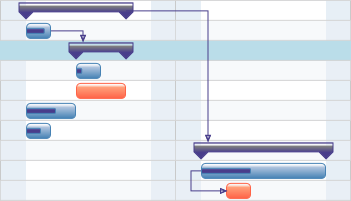
Row Borders in GanttChart area.
You can do this as follows:
First listen to ganttControl TemplateApplied and listen the LoadingRow event to get the GanttTaskItemBar or the TasksListControl on row load. Then use the AddBottomBorder API in both cases to do the same.
In GanttControl:
|
void ganttControl_TemplateApplied(object sender, EventArgs e) { this.ganttControl.GanttChart.LoadingRow += GanttChart_LoadingRow; } void GanttChart_LoadingRow(object sender, GanttChartRowEventArgs e) { GanttTaskItemBar bar = e.Row as GanttTaskItemBar; // This API will help us to customize the border of the chart rows. bar.AddBottomBorder(1, Colors.Red); } |
In FlexyGantt:
|
void ganttControl_TemplateApplied(object sender, EventArgs e) { this.ganttControl.GanttChart.LoadingRow += GanttChart_LoadingRow; } void GanttChart_LoadingRow(object sender, GanttChartRowEventArgs e) { TasksListControl row = e.Row as TasksListControl; // This API will help us to customize the border of the chart rows. row.AddBottomBorder(1, Colors.LightGray); } |
� RadiantQ 2009 - 2019. All Rights Reserved.