|
RadiantQ WPF Gantt
Expand/Collapse Arrow doesn't work anymore. How to fix this?
|   |
|
RadiantQ WPF Gantt
Expand/Collapse Arrow doesn't work anymore. How to fix this?
| |
Expand/Collapse Arrow doesn't work anymore. How to fix this?
Sometimes the expand/collapse icon goes out of sync with the expanded state of a node, like this:
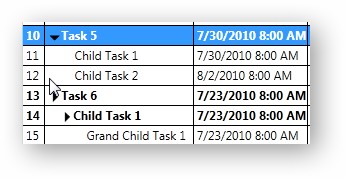
The icons should show expanded.
This usually happens when you have defined a read-only (no CellEditingTemplate) template column like this:
<DataGridTemplateColumn Header="Name">
<DataGridTemplateColumn.CellTemplate>
<!-- DataContext for the DataTemplates here will be an instance of FlexyNodeData.-->
<DataTemplate>
<fxgantt:ExpandableTextBlock Text="{Binding Data, Converter={StaticResource nameConverter}}"></fxgantt:ExpandableTextBlock>
</DataTemplate>
</DataGridTemplateColumn.CellTemplate>
</DataGridTemplateColumn>
To fix this issue, include the IsReadOnly property as follows:
<DataGridTemplateColumn Header="Name" IsReadOnly="True">
... in the template.
� RadiantQ 2009 - 2019. All Rights Reserved.