|
RadiantQ WPF Gantt
Enabling Row Drag And Drop
|   |
|
RadiantQ WPF Gantt
Enabling Row Drag And Drop
| |
Enabling Row Drag and Drop
Row drag and drop in the table view is enabled by default in the GanttControl. Moving the mouse over the row header will provide you a drag cue using which you can drag one or more selected rows:
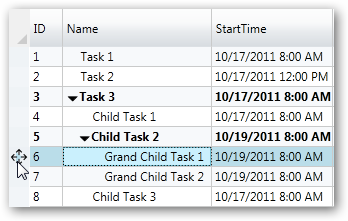
Drag cue to help drag selected rows
You can however disable this feature by setting the gantt's CanUserReorderRows property to false.
Drop as Child
By default, the gantt lets you drop the selected tasks above or below another existing task like this:
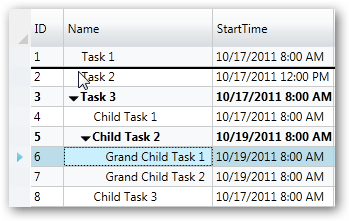
Dragging a task next to another task
However, you can optionally also allow dropping a set of tasks as a child of another task when the mouse is over the middle of this destination task. You can do this as follows:
public MainPage()
{
InitializeComponent();
this.ganttControl.ItemsSource = this.GetDataSource();
this.ganttControl.TemplateApplied += new EventHandler(ganttControl_TemplateApplied);
}
void ganttControl_TemplateApplied(object sender, EventArgs e)
{
this.ganttControl.GanttTable.EnableDropAsChild = true;
}
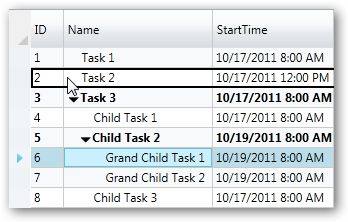
Dropping a task into another task to make it a child of that task.
Drag Events
While dragging, the GanttTable.SelectedRowsDrag event is raised to allow you to selectively disallow dragging tasks into some locations. The arguments for this event allow you to cancel some drop positions selectively:
void GanttTable_SelectedRowsDrag(object sender, SelectedRowsDragEventArgs args)
{
IActivityView selectedView = this.ganttControl.GanttTable.SelectedItem as IActivityView;
TaskInfo selectedTask = ((DataBoundActivity)selectedView.Activity).DataSource as TaskInfo;
// Note that "selectedView.Activity.Parent" will give you the parent of an activity.
if (args.DragOverRowIndex == 0)
{
// can it be dropped way on top? If not, set args.Cancel = true;
}
else if (args.DragOverRowIndex == this.ganttControl.ActivityViews.Count)
{
// can the selected task be dropped way at the bottom? If not, set args.Cancel = true;
}
else
{
TaskInfo dropTask = ((DataBoundActivity)this.ganttControl.ActivityViews[args.DragOverRowIndex].Activity).DataSource as TaskInfo;
// Can the selected task be dropped above this?
}
// To prevent dragging tasks at the top level.
if (selectedTask.IndentLevel == 0)
args.Cancel = true;
}
� RadiantQ 2009 - 2019. All Rights Reserved.