|
RadiantQ WPF Gantt
Enabling Row Drag And Drop
|   |
|
RadiantQ WPF Gantt
Enabling Row Drag And Drop
| |
Enabling Row Drag And Drop
You can turn on drag and drop of rows in the FlexyGantt's FlexyTable as follows:
public MainPage()
{
InitializeComponent();
this.fxgantt.FlexyTableCreated += new EventHandler(fxgantt_FlexyTableCreated);
}
void fxgantt_FlexyTableCreated(object sender, EventArgs e)
{
// Turns on dragging rows
this.fxgantt.FlexyTable.CanUserReorderRows = true;
// Allows dropping as a child of another row.
this.fxgantt.FlexyTable.EnableDropAsChild = true;
// Event that gets called when a row is dropped over another.
this.fxgantt.FlexyTable.SelectedRowsDrop += newRadiantQ.Windows.Controls.Gantt.SelectedRowsDropEventHandler(FlexyTable_SelectedRowsDrop);
}
This will allow you to start dragging rows:
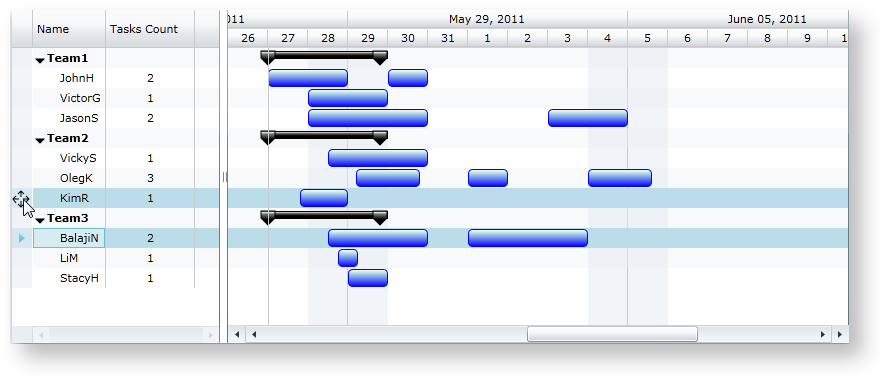
Dragging a FlexyGantt row
Next, listen to drop events as follows:
void FlexyTable_SelectedRowsDrop(object sender, RadiantQ.Windows.Controls.Gantt.SelectedRowsDropEventArgs args)
{
// Here the args will give you the rows that are being dragged and the destination row, including whether the user wanted the rows to be dropped as sibling or children.
}
A sample that illustrates this feature can be located here in the install:
..\Samples\FlexyGantt\User Interaction\MovingResourceRows.
� RadiantQ 2009 - 2019. All Rights Reserved.